




Key Takeaways
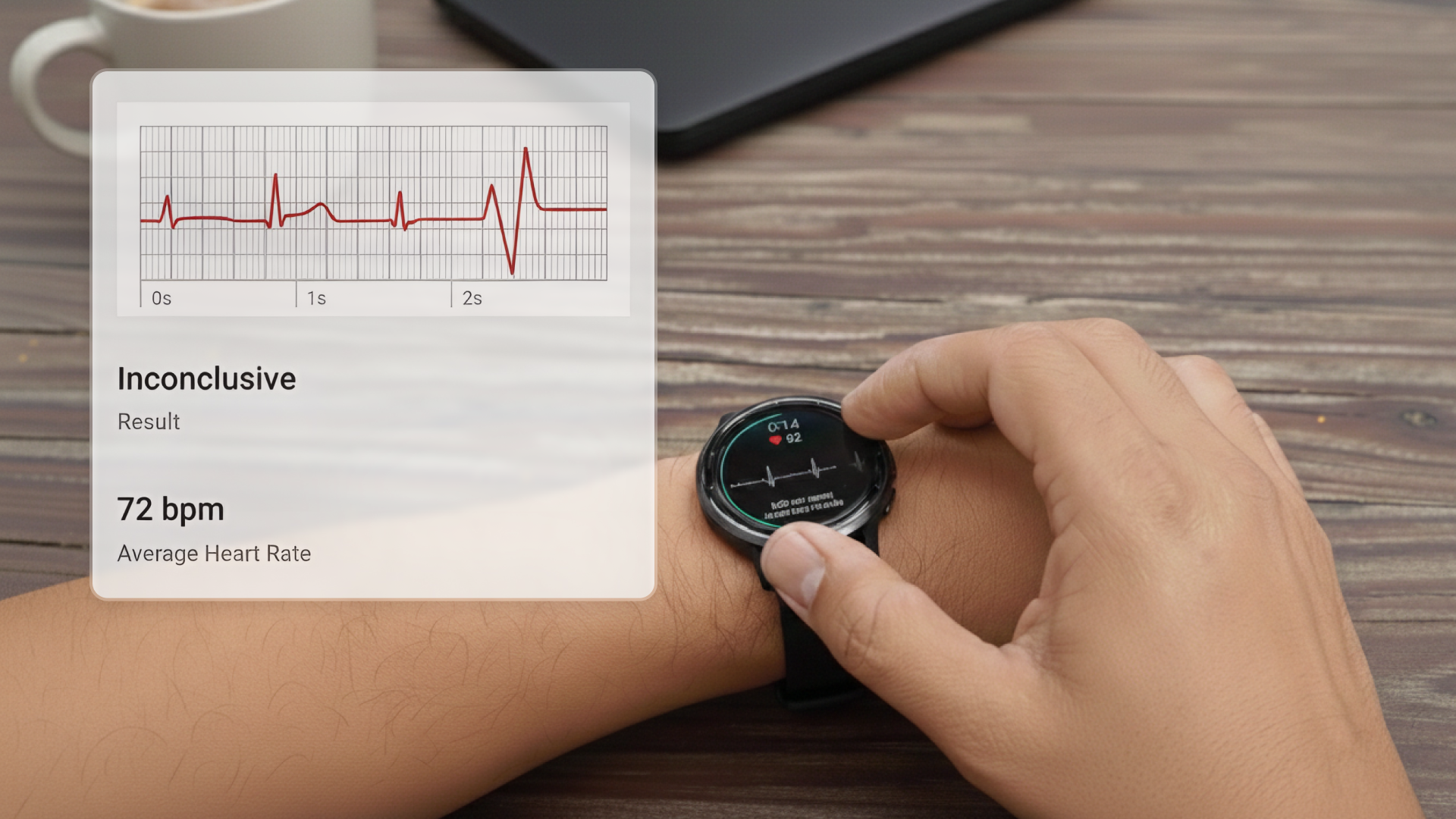
- Garmin Inconclusive ECGs aren't always a cause for concern, though they can be a sign of irregular heartbeats or abnormal heart rhythms.
- To start, we'll show you how to take ECGs from your Garmin watch that are less likely to result in an Inconclusive.
- If you're still seeing Inconclusive ECGs, you may have an abnormal heart rhythm that's not detectable by the Garmin ECG app.

- Garmin Inconclusive ECGs aren't always a cause for concern, though they can be a sign of irregular heartbeats or abnormal heart rhythms.
- To start, we'll show you how to take ECGs from your Garmin watch that are less likely to result in an Inconclusive.
- If you're still seeing Inconclusive ECGs, you may have an abnormal heart rhythm that's not detectable by the Garmin ECG app.
User Profile
Related Garmin Guides
Got other questions on your Garmin watch? See the complete set of Qaly guides on Garmin:
- How to Read an ECG: Stanford Cardiologist Explains
- The Ultimate Cardiologist's Guide to the Smartwatch ECG
Introduction
The Inconclusive Garmin ECG result is one of the most frustrating experiences when monitoring your heart health. In your frustration, you might be wondering, "What does Inconclusive mean on my Garmin ECG?" Or you might be thinking, "Why does my Garmin ECG keep saying Inconclusive?" In this guide, we'll help answer these questions, and we'll share some tips on how to take ECGs that don't result in Inconclusive. Let's dive in.
Understanding Garmin ECG Results
The Garmin ECG app can provide several different results. It's important to understand the difference between an "Inconclusive" result and a "Heart Rate Too High or Too Low" result, as they mean different things:
Heart Rate Too High or Too Low
If your heart rate is over 120 beats-per-minute (bpm) or under 50 bpm, you'll receive a specific "Heart Rate Too High or Too Low" result. This is NOT the same as Inconclusive - it simply means the Garmin ECG app cannot check for AFib when your heart rate is outside the 50-120 bpm range. This is common for highly fit athletes (who often have resting heart rates below 50 bpm) or immediately after exercise (when heart rate is above 120 bpm).
Inconclusive
An Inconclusive result means your recording couldn't be classified for other reasons. This could be due to any of the following:
- The way you're taking your ECG is leading to low signal quality (poor skin contact, too much movement, electrical interference).
- You have a pacemaker or implantable cardioverter defibrillator (ICD).
- You're showing signs of other arrhythmias or heart conditions outside of Sinus Rhythm and Atrial Fibrillation that the Garmin ECG app isn't designed to recognize.
Other arrhythmias that might cause an Inconclusive ECG on Garmin include Premature Atrial Contraction (PAC), Premature Ventricular Contraction (PVC), Supraventricular Tachycardia (SVT), and Ventricular Tachycardia (V-Tach).
How Do I Avoid an Inconclusive ECG?
First things first, let's make sure you're taking an ECG properly, so that your Garmin watch doesn't label your ECG Inconclusive.
To do this, see if you're still getting an Inconclusive ECG after each of the following steps:
- Get comfortable and relax. If you take your ECG when your arms are shaking or moving, it can lead to an Inconclusive ECG. Sit down comfortably. Take three, long, deep breaths. Rest both your arm and wrist on a table or flat surface to minimize movement.
- Make sure your Garmin watch fits snugly. Your ECG's signal quality is low when your Garmin watch is so loose that it doesn't touch your skin properly. The band should be snug but still comfortable. The back of your Garmin watch must be touching your wrist. Wear the watch just above your wrist bones toward your elbow, not directly on the wrist bones.
- Keep your skin and Garmin watch clean and dry. Sweat, lotions, or water can interfere with the signal quality of your ECG. First, take off your Garmin watch. Then, dry the area where you normally wear your watch. Next, dry both your thumb and index finger that you'll use to place on the metal ring around the watch face. Last, dry the back of your Garmin watch and the metal ring/bezel to clean all of the sensors involved in taking your ECG. You're now ready to strap your Garmin watch back on and take another ECG.
- Follow Garmin's finger placement instructions carefully. Garmin requires you to place your thumb and index finger on the metal ring (or bezel) around the watch face while keeping your arm still. Make sure you're maintaining firm, steady contact with the metal ring throughout the entire 30-second recording. Light or inconsistent pressure can result in poor signal quality. Only use your thumb and index finger - don't use other fingers or parts of your hand.
- Warm up cold or dry skin. Dry skin, cold skin, or a hairy wrist can prevent the Garmin ECG app from recording your ECG properly. If your skin feels cold or dry, remove the watch and rub your wrist gently to warm the skin. You can also use moisturizing lotion on your hands and wrist. Put the watch back on and try again.
- Distance yourself from other electronics. If you have electronic devices nearby that are plugged into an outlet, it can cause electrical interference with your ECG. If you can, try moving away from any electronic devices that are plugged into an outlet, including metal detectors and electromagnetic anti-theft systems.
If you're still seeing an Inconclusive Garmin ECG after taking steps to improve signal quality, it may be a sign of an underlying heart abnormality like an SVT ECG or a Short PR Interval.


What If I Get 'Heart Rate Too High or Too Low'?
If you receive a "Heart Rate Too High or Too Low" result, this is different from an Inconclusive result. This specific message means the Garmin ECG app cannot check for AFib because your heart rate is outside the 50-120 bpm range.
If your heart rate is below 50 bpm: This is common for highly fit athletes and people with excellent cardiovascular fitness. It can also be caused by certain medications or heart conditions. If you're an athlete with a low resting heart rate and want to take an ECG reading, you may need to do light activity (like jogging in place or walking) to raise your heart rate above 50 bpm, then quickly take your ECG reading.
If your heart rate is above 120 bpm: This is normal during exercise and for a short time afterward. It can also be caused by high stress levels, infection, dehydration, alcohol use, and certain heart conditions including AFib. If you want to take an ECG reading, wait until your heart rate drops below 120 bpm before attempting the recording.
If you repeatedly get this result when your heart rate should be in the normal range, or if you don't feel well, speak with your doctor.
Will Garmin Detect Abnormal ECGs?
Garmin will not always detect abnormal ECGs. The Garmin ECG app is specifically designed to detect Atrial Fibrillation (AFib) and distinguish it from Normal Sinus Rhythm. It will also identify when your heart rate is too high (above 120 bpm) or too low (below 50 bpm) to accurately check for AFib. However, other arrhythmias - such as an SVT ECG, which Garmin cannot detect - may come up as an Inconclusive ECG. In these cases, get your Inconclusive ECG read by experts like the ones on the Qaly app (App Store or Play Store). As always, if you're experiencing symptoms with your Inconclusive ECG, or if you see any signs of abnormal heart rhythms, contact your healthcare provider as soon as possible to rule out underlying heart conditions. To better understand how to see signs of abnormal heart rhythms on your ECG, take a look at Qaly's guide on how to read your ECG.
Conclusion
Well, that just about wraps up our guide on what an Inconclusive ECG means on your Garmin watch. We hope this could be of some help to you.
If you're still getting Inconclusive ECGs or if you need help interpreting your Inconclusive ECGs, don't worry, we understand how frustrating and confusing it can be to experience them. That's why we created the Qaly app for you and for the hundreds of millions of people around the world who experience irregular heartbeats and abnormal heart rhythms. On the Qaly app, human experts will interpret your Inconclusive ECGs within minutes for clarity and peace of mind.
To get started with the Qaly app, grab the Qaly app from the App Store or Play Store today. If you have any more questions, or if you need our help in any other way, don't hesitate to reach out to us at support@qaly.co.
As always from the team at Qaly, stay heart healthy ❤️

Got a Garmin Inconclusive ECG? On the Qaly app, certified human experts review your Garmin ECGs within minutes. Get clarity today.



.png)
.png)