




Key Takeaways

User Profile
Hello Heart Hero.
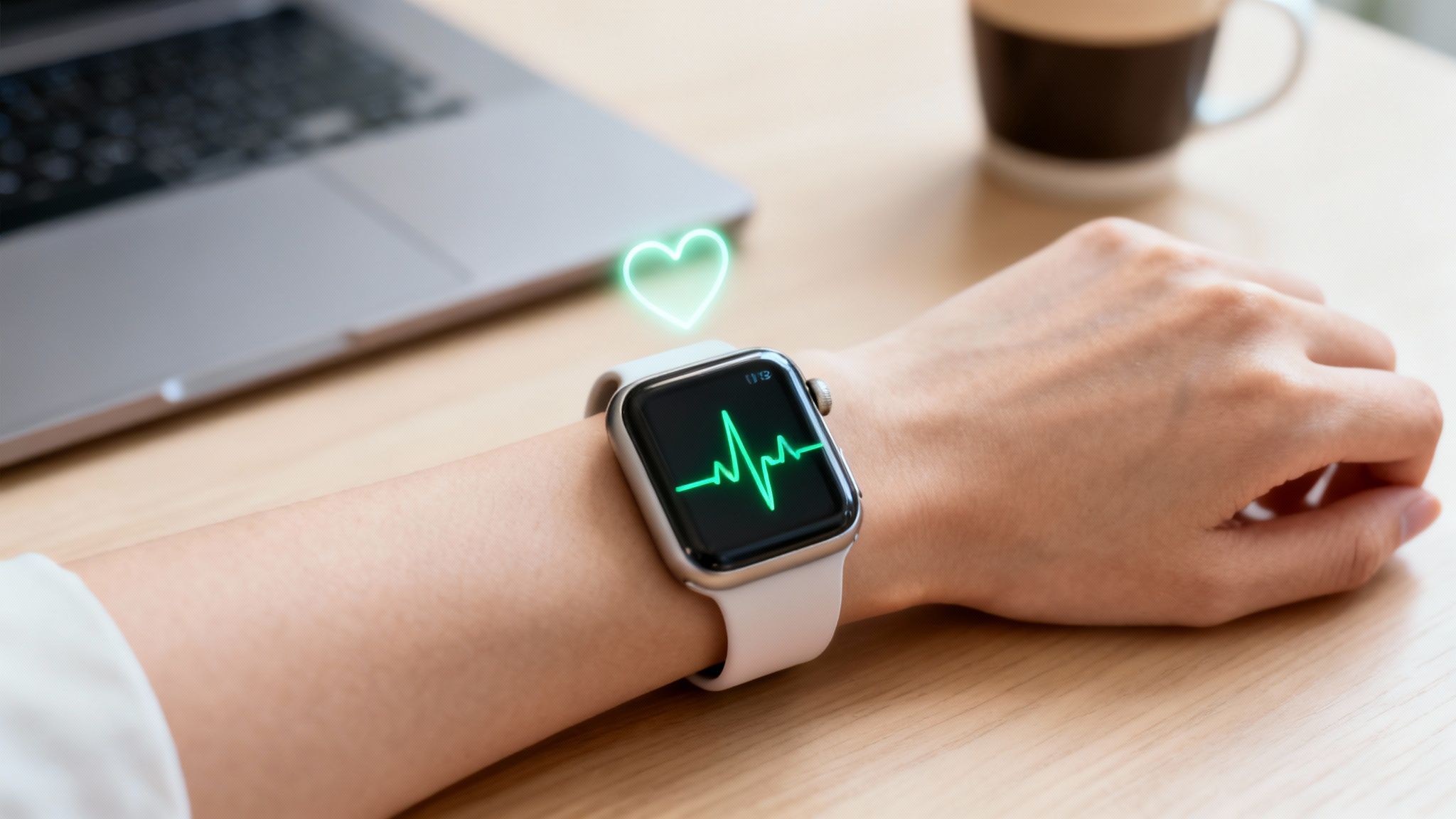
The ECG for Apple Watch is a powerful tool that lets you take an electrocardiogram right from your wrist. It gives you a snapshot of your heart's electrical rhythm, designed to help you capture symptoms as they happen and screen for conditions like Atrial Fibrillation (AFib). Think of it as a way to better understand your heart health, on your own terms.
Your Personal ECG Guide
We get it. Diving into health technology can feel a little intimidating, especially when it involves something as vital as your heart. Many people are searching for ways to feel more in control of their health, for tools that bring clarity, not confusion. This guide is here to be your trusted resource on that journey.
Consider the ECG app on your Apple Watch a helpful partner. It’s there for you whenever you feel a flutter, a skipped beat, or just want the peace of mind that comes from checking in with your body.
What This Guide Will Do for You
Our goal is to demystify this incredible feature without burying you in medical jargon. We want you to feel empowered, not overwhelmed.
Together, we’ll walk through:
- How It Works: Simple explanations of the technology behind the ECG app.
- Taking a Reading: Practical, step-by-step instructions to get a clear result.
- Understanding Results: What common readings like "Sinus Rhythm" or "AFib" actually mean for you.
- Its Limitations: An honest look at what your watch can and cannot detect.
This technology puts valuable information directly into your hands, helping you become a more informed partner in your own healthcare. It’s about turning moments of uncertainty into opportunities for understanding.
Feeling a bit skeptical or anxious is completely normal. It’s your heart, after all. But knowledge is the best remedy for that uncertainty. By the end of this guide, you’ll have a clear picture of how the Apple Watch ECG works and how you can use it to support your health.
You’re not alone in this, and taking this step to learn more is a powerful move. Let’s begin this journey together.
How Your Apple Watch ECG Actually Works
It can feel a bit like magic, but the way your Apple Watch captures an ECG is actually quite simple and clever. Let's pull back the curtain and see how that little device on your wrist pulls off such a big job.
Think of your heart's rhythm as its own electrical song. An electrocardiogram, or ECG, is just a tool that listens to and records that song, showing the timing and strength of the electrical signals that make your heart beat.
Your Apple Watch uses two points of contact to listen in. The first sensor is on the crystal back of the watch, which rests against your wrist. The second is built right into the Digital Crown, waiting for you to place your finger on it.
When you take a reading, your body completes an electrical circuit. This closed loop allows the watch to measure the tiny electrical pulses that travel from your heart, down one arm, across your chest, and up the other arm to your fingertip. It creates a clear window into what your heart is doing at that very moment.
The Power of a Single Lead
The ecg for apple watch gives you what's called a single-lead ECG. Understanding what this means is crucial, because it sets the right expectations for what the watch can and can't do for you.
Imagine you're trying to figure out what's happening in a big, busy room. A single-lead ECG is like listening from one specific spot. You can hear the overall rhythm and tempo, and you can definitely tell if a major disruption happens, like someone knocking over a drum set. It's incredibly valuable for catching common problems.
A 12-lead ECG, the kind you get in a hospital, is completely different. It's like having 12 microphones placed all around that same room. This setup gives doctors a much more detailed, 3D picture of the heart's electrical activity from many different angles.
Knowing this difference is key.
- Your Apple Watch is great at: Screening for potential Atrial Fibrillation (AFib), checking your heart rate, and recording the rhythm for a doctor to review later.
- Your Apple Watch cannot: Detect a heart attack, diagnose every complex arrhythmia, or see issues with blood flow or the heart muscle itself.
Think of it this way: Your watch is a world-class screening tool, not a full-service diagnostic lab. It's designed to give you a heads-up that something might be worth looking into, providing you with a real piece of data to start a conversation with your doctor.
Built on a Foundation of Trust
This technology isn't just a gadget; it's backed by serious science and validation. When Apple first introduced this feature, it was a huge step forward for personal health monitoring.
The Apple Watch ECG function received clearance from the FDA back in 2018. This was based on a clinical trial with over 600 people, which found the sensor was remarkably accurate for its intended purpose. It achieved 99.6% specificity when classifying normal sinus rhythm and 98.3% sensitivity when it came to detecting Atrial Fibrillation.
Those numbers show that your watch is a very reliable tool for flagging this specific condition. For a deeper dive, you can always check out a cardiologist's guide to the smartwatch ECG.
By understanding that your watch gives you a single, but very valuable, "view" of your heart's music, you can use it to your advantage. It empowers you to capture symptoms as they happen and share solid information with your doctor, closing the gap between what you feel and what they can see.
Taking An Accurate ECG Step by Step
Taking an ECG with your Apple Watch should feel calm and empowering, not like a stressful medical test. The whole idea is to get a clear, trustworthy snapshot of your heart’s rhythm right when you need it. Let’s walk through how to get the best possible reading, every single time.
Think of it like taking a good, clear photograph. If you move the camera or your subject is out of focus, the picture won't be very useful. The same exact principle applies here. A few simple preparations can be the difference between a clean recording and a frustrating "inconclusive" result.
Preparing for a Clean Reading
First things first, find a comfortable spot where you can sit and relax for a minute. Your environment actually matters quite a bit. A quiet space where you won’t be distracted helps you stay still, which is the most critical part of getting an accurate ECG.
Next, give your watch fit a quick check. It should be snug against the wrist you’ve selected in your Apple Watch settings, but not so tight that it’s uncomfortable. If the watch is too loose, it can’t maintain solid contact with your skin, which is a very common reason for a failed reading.
Now for the pro-tip: rest the arm that’s wearing the watch on a flat, stable surface like a table or even just your lap. This one simple move helps prevent the tiny, almost unnoticeable muscle movements in your arm from creating electrical "noise" that can mess with the sensitive ECG sensors. Just let your arm and hand go limp.
Recording Your ECG
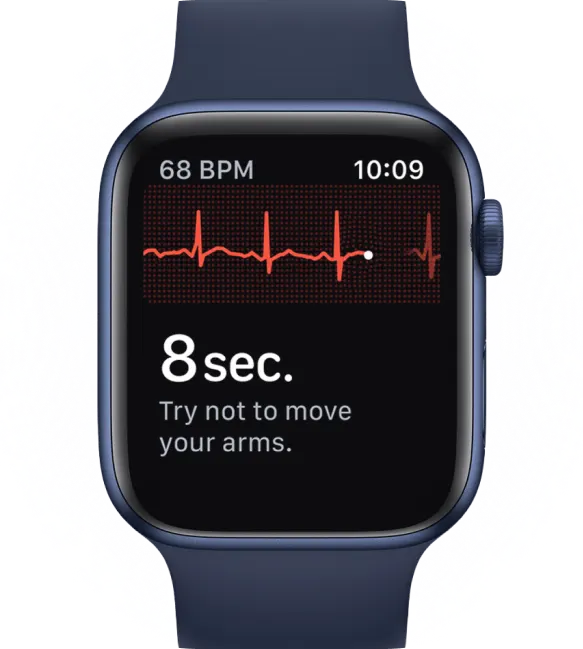
Once you're prepped, the recording part is easy. The whole process only takes 30 seconds, so just take a deep breath and stay relaxed.
- Open the ECG App: Find and tap the ECG app icon on your Apple Watch. It’s the one that looks like a white circle with a red heart rhythm line going through it.
- Place Your Finger on the Crown: Gently rest a finger from your opposite hand on the Digital Crown. You don't need to press down hard, just maintain light contact. This completes the electrical circuit the watch needs to take the reading.
- Stay Still and Breathe: A countdown will start on the watch face. Do your best to remain as still as you can and just breathe normally. Try to avoid talking or making any big movements with your body.
After the 30-second recording is done, your Apple Watch will immediately show you the result. You might see "Sinus Rhythm," "Atrial Fibrillation," or another classification. Sometimes, you'll get a "Poor Recording." If that happens, don't sweat it. Check out our guide on what a poor recording on an Apple Watch ECG means for some great troubleshooting tips.
Your ECG is a single moment in time. The most valuable recordings are often the ones taken when you are actually feeling a symptom, like a flutter or a skipped beat. Capturing these events provides powerful information for you and your doctor.
Accessing and Sharing Your ECG History
Every ECG you take is automatically saved and stored securely right in the Health app on your iPhone. This is where the real power of the feature shines, as it lets you build a personal history of your heart's activity over time.
To see your history or share a specific ECG:
- Open the Health App: On your iPhone, open up the Health app.
- Navigate to Your ECGs: Tap the "Browse" tab at the bottom, then choose "Heart," and finally select "Electrocardiograms (ECG)."
- Select a Recording: You'll see a list of all your past ECGs. Just tap on any one to view the detailed rhythm strip.
- Export as a PDF: Once you're viewing an ECG, scroll down a bit and you’ll find the option to "Export a PDF for Your Doctor."
This export function is incredibly useful. It turns your data into a clean, professional document that you can easily email to your doctor's office or print out for your next visit. This simple PDF transforms a personal data point into a clinical tool, paving the way for a much more productive and informed conversation with your healthcare provider.
Understanding Your Apple Watch ECG Results
So you’ve just taken an ECG, and now a strange-looking word is staring back at you from the screen. Seeing something like “AFib” or even “Sinus Rhythm” can be a little jarring if you don’t know what it means. It’s completely normal to feel a bit of uncertainty.
Let’s walk through what these results mean. Think of this as your guide to making sense of the data your heart is sharing with you.
Sinus Rhythm: The All-Clear Signal
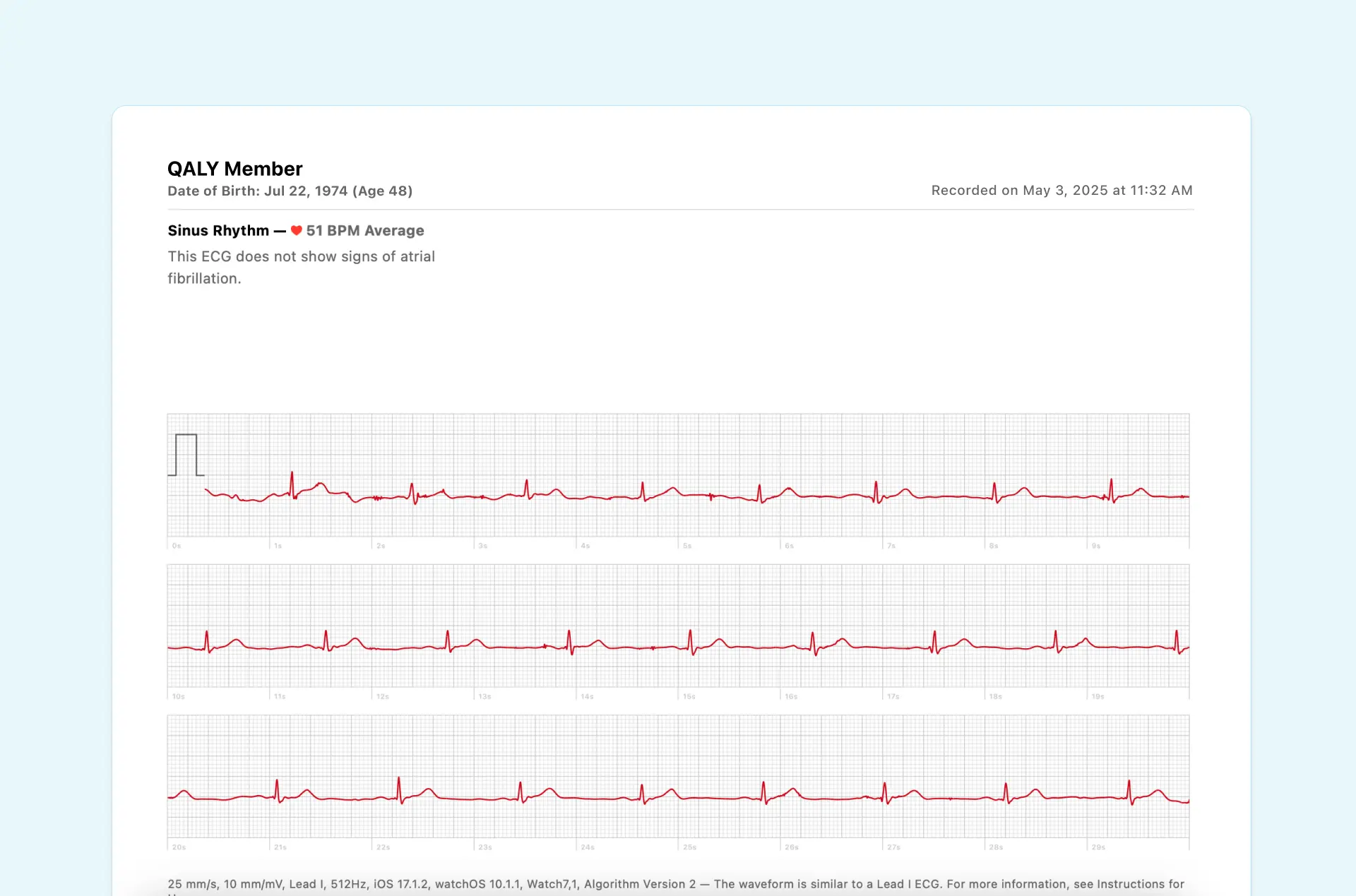
If your result is Sinus Rhythm, you can take a nice, deep breath. This is the classification everyone hopes to see. It means your watch detected a normal, steady heartbeat between 50 and 100 beats per minute.
In simple terms, your heart’s upper and lower chambers are beating in perfect sync, like a well-rehearsed drumline. This is the sign of a regular rhythm and is considered the baseline for a healthy heart. Most of the time, you won’t feel anything unusual during a sinus rhythm because it’s just your body doing its thing.
Atrial Fibrillation (AFib): An Irregular Beat
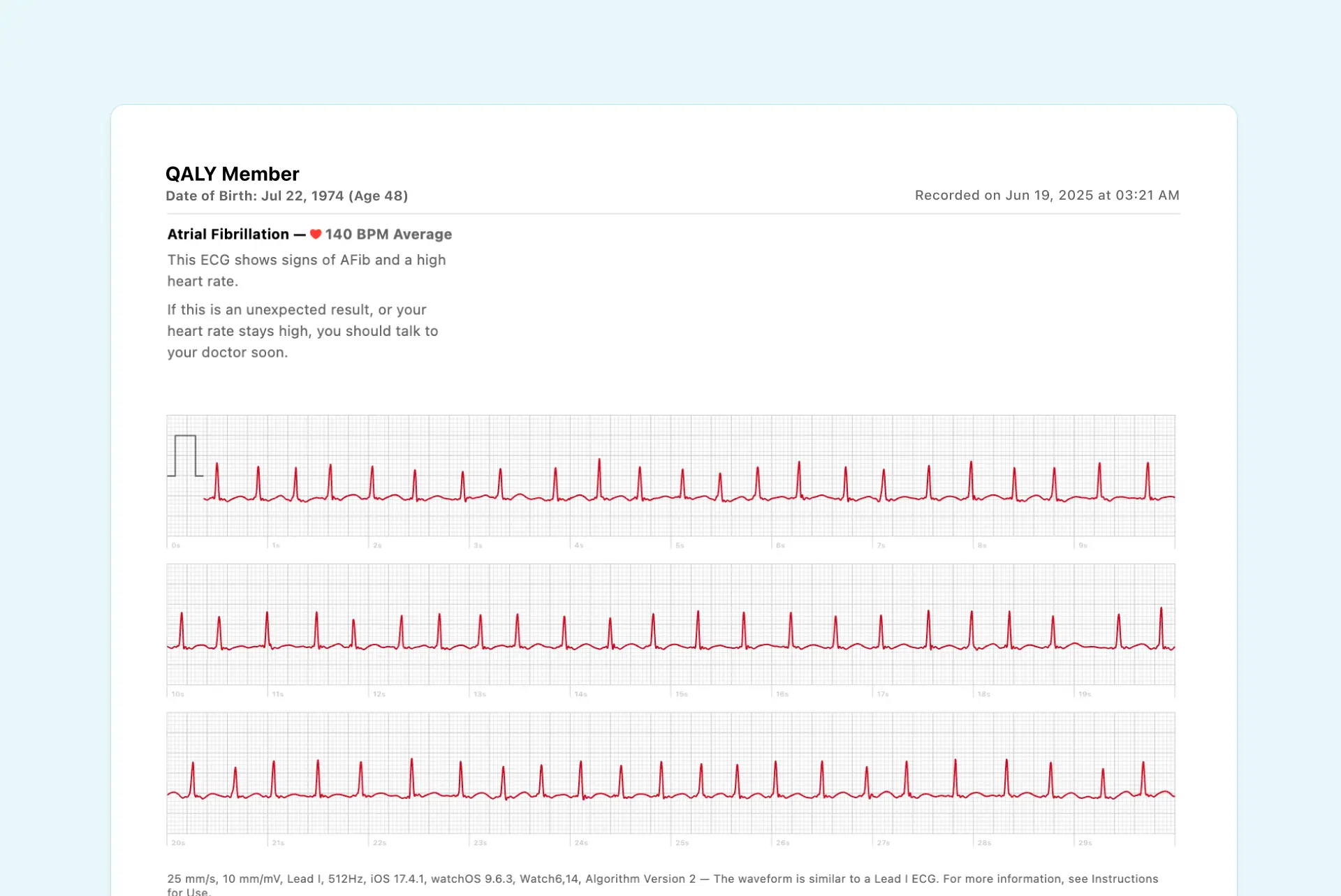
Getting an Atrial Fibrillation (AFib) notification can feel scary, but knowing what it means is your best first step. This result means the watch detected an irregular heart rhythm.
Imagine your heart's upper chambers (the atria) are quivering chaotically instead of beating with a strong, steady squeeze. This electrical chaos causes the lower chambers (the ventricles) to beat irregularly, too. For some people, this feels like a fluttering or "quivering" in the chest. Others might feel palpitations, get short of breath, or feel nothing at all.
It's important to note that devices like the Apple Watch might occasionally flag multiple ectopic beats, such as premature ventricular contractions (PVCs) and premature atrial contractions (PACs), as AFib. An AFib classification is a signal to take the next step. It doesn't mean you're in immediate danger, but it’s critical information to share with your doctor. They can help figure out if it was a one-off event or if it needs a closer look.


High or Low Heart Rate
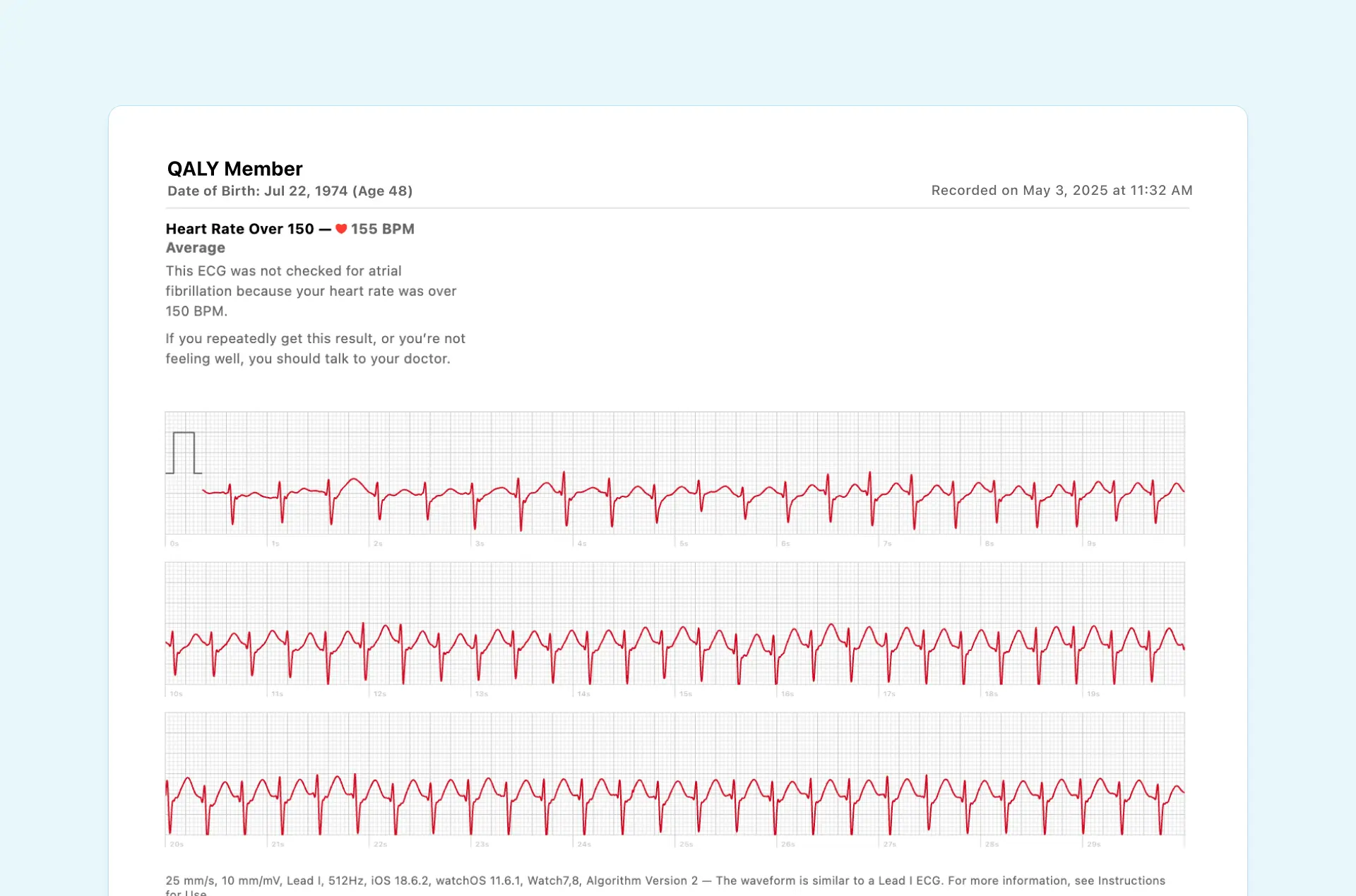
Sometimes, your ECG result will come with an extra note about your heart rate.
- High Heart Rate: This simply means your heart was beating faster than 100 beats per minute. This is totally normal if you just finished a workout or are feeling stressed out. If it happens while you're resting, though, it’s worth paying attention to.
- Low Heart Rate: This means your heart was beating slower than 50 beats per minute. For athletes or during deep sleep, this can be quite common. But if you’re also feeling dizzy or tired, it’s something to bring up with your doctor.
These aren't diagnoses on their own, but they add important context to your ECG. They help paint a fuller picture of what was happening during that 30-second recording.
Inconclusive: Time for a Do-Over
An inconclusive reading is one of the most common results, and it usually isn’t a cause for alarm. It just means the app couldn’t get a clear enough signal to make a call one way or the other.
This often happens because of a little bit of movement, a loose watch band, or even electrical "noise" from your own muscles. The best thing to do is simply follow the steps for taking a good, clean reading and try again.
To help you nail it every time, this flowchart breaks down the key steps for getting a clean ECG recording.
What About Other Feelings and Flutters?
So what if you feel a skipped beat or a flutter, but your watch reports "Sinus Rhythm"? This is a really common and often confusing situation. Your Apple Watch is designed specifically to screen for AFib, but it can actually record many other types of arrhythmias without putting a name to them.
Common palpitations like Premature Ventricular Contractions (PVCs) or brief runs of Supraventricular Tachycardia (SVT) can absolutely be captured on your ECG strip. While the app won't label them, the electrical evidence is right there for a trained eye to see. Those squiggles and lines contain deeper clues, including important timing measurements called intervals. To learn more, check out our guide that helps in demystifying PQRST intervals on the Apple Watch ECG.
This is where the true power of your watch comes into play. It gives you the ability to capture those fleeting symptoms and share the raw data with a professional who can interpret the nuances that the app itself might miss.
When Your Watch Doesn't Tell The Whole Story
Your Apple Watch is a brilliant tool for getting a glimpse into your heart's rhythm. But it’s important to have an honest look at what it can and can’t do. Think of it like a sharp-eyed security guard trained to spot one specific problem, Atrial Fibrillation, but who might not recognize every other kind of subtle disturbance.
This doesn't mean your watch isn't doing its job. It just means that sometimes, the most important clues are hiding in the details the app itself doesn’t announce.
What Your Watch Can Record But Not Diagnose
Have you ever felt a distinct flutter, a skipped beat, or a sudden racing pulse, only for your ECG result to come back as "Sinus Rhythm"? It’s a common experience that can feel incredibly confusing and frustrating. This usually happens because your watch did record an arrhythmia, just not the one it's designed to name.
Your ECG for Apple Watch absolutely captures these events, but its built-in algorithm isn't programmed to put a name to them.
- Premature Ventricular Contractions (PVCs): These are extra, early heartbeats coming from the heart's lower chambers. Many people describe them as a "skipped" or "pounding" beat, and they're very common.
- Supraventricular Tachycardia (SVT): This is a blanket term for a fast heart rhythm that starts in the heart's upper chambers. It can feel like a sudden burst of a rapid heartbeat that starts and stops out of nowhere.
While the app won’t pop up an alert saying "PVC" or "SVT," the electrical evidence is often clearly visible on the ECG strip for a trained professional to see. The recording itself is still incredibly valuable.
The Importance of Heart Rhythm Intervals
Beyond just flagging irregular beats, your ECG recording is packed with a treasure trove of data in the form of intervals. These are simply measurements of the time it takes for your heart's electrical signal to travel through its different parts.
Think of your ECG as a piece of sheet music. A basic review might just check if the tempo is steady. But a trained musician can analyze the timing of every single note, the intervals, to understand the full performance.
A few key intervals that offer deeper insights are:
- PR Interval: This measures the time it takes for the electrical signal to travel from the upper chambers (atria) down to the lower chambers (ventricles).
- QRS Interval: This shows how long it takes for that signal to spread throughout the ventricles.
- QTc Interval: This measures the total time it takes for the ventricles to electrically fire and then reset for the next beat.
For some people, tracking these intervals is critical, as changes can sometimes be linked to certain medications or underlying heart conditions. The good news? Your Apple Watch ECG captures all the raw data needed to measure them.
The increasing interest in personal heart monitoring reflects a broader trend. Many individuals are seeking improved methods to manage their health, particularly as cardiovascular diseases continue to be a leading cause of mortality globally.
Frequently Asked Questions About The Apple Watch ECG
It’s completely normal to have questions as you start exploring your heart health with your watch. Getting comfortable with this new tool is the first step. Here are a few common questions we see, with answers to give you some clarity and confidence.
How Accurate Is The ECG On The Apple Watch
The Apple Watch ECG is surprisingly good at what it’s built for: screening for possible signs of Atrial Fibrillation (AFib). In fact, clinical studies back this up, showing it has very high sensitivity and specificity for spotting this one particular arrhythmia.
But it’s important to keep things in perspective. It's a single-lead ECG, not the 12-lead machine you’d find in a hospital. This means it can't see the full picture of your heart's electrical activity and won't detect every possible heart condition, like a heart attack. Think of it as a reliable screening partner, great for flagging potential issues that need a closer look from a professional.
What Should I Do If I Get An Inconclusive Reading
First off, don't panic. Seeing an "inconclusive" reading is incredibly common and usually doesn't mean something is wrong. The smallest things can cause it, like a little bit of movement, dry skin, or the watch not sitting snugly on your wrist.
The best thing to do is simply try taking another one. Find a quiet spot, sit down, and rest your arm on a table or your lap to keep it steady. If you keep getting inconclusive results, especially if you're feeling symptoms like palpitations, that’s a good time to save the recording and share it with your doctor or a service like Qaly.
Can The Apple Watch ECG Detect A Heart Attack
No, and this is the most critical thing to understand for your safety. The Apple Watch ECG cannot detect a heart attack.
A heart attack is a medical emergency caused by a sudden blockage of blood flow to the heart. Diagnosing it requires a comprehensive 12-lead ECG and other urgent tests in a hospital setting. Your watch simply doesn't have the capability.
If you are experiencing symptoms that could indicate a heart attack, such as chest pain, shortness of breath, or discomfort spreading to your arms, back, neck, or jaw, please call for emergency medical help immediately. Do not rely on your watch in this situation. Your safety is what matters most.

When the automated results from your watch leave you with more questions than answers, Qaly is here to provide the clarity you need. Our certified cardiac technicians are on-call 24/7 to analyze your Apple Watch ECGs.



.png)
.png)