


Key Takeaways

User Profile
Hello Heart Hero. You felt something odd in your chest, maybe a flutter, maybe a hard thump, maybe a rhythm that suddenly didn’t feel like your own. So you did what many people do now. You looked at your Apple Watch and tried to get an answer faster than the healthcare system seems willing to give one.
That move makes sense. It’s practical, proactive, and often reassuring. But it can also open a new kind of stress, because a recording is one thing and understanding it is another.
A lot of people end up stuck in that gap. They have a watch, a graph, and a growing list of questions. Is this normal? Did I do the test right? Should I wait, call someone, or worry? If you’ve felt dismissed, delayed, or forced to piece things together on your own, you’re not overreacting. You’re trying to make sense of your body with the tools you have.
Your Guide to Understanding Your Heart
A good ecg app for apple watch can help you catch a rhythm in the moment. That matters because heart symptoms often come and go. By the time you sit in a clinic, the flutter may be gone.
Still, the watch doesn’t magically remove uncertainty. A wavy line on a small screen can feel both comforting and confusing. One minute you feel confident. The next minute you’re zooming in on tiny spikes and wondering if you’re missing something serious.
Here’s the reassuring part. You do not need to become a cardiologist to use this tool well. You just need to understand what the watch is built to do, what can affect the quality of a reading, and what kinds of results deserve a second look.
Your watch can be a helpful first capture of what your heart is doing at that moment. It is not a full answer by itself.
Consider taking a photo in dim light. If the camera is steady, dry, and positioned well, the picture is much clearer. If your hand moves or the lens is foggy, the result tells you less. The same idea applies here.
That’s why the most useful approach is simple:
- Capture the moment well: A clean recording gives you a much better starting point.
- Read the result calmly: Not every unusual result means danger.
- Know the limits: Some conditions can’t be seen by the watch at all.
- Get human interpretation when needed: Raw data is not the same as medical understanding.
If you’ve been trying to bridge the distance between symptoms and answers, you’re in the right place.
How to Take a Reliable ECG with Your Apple Watch
A reliable reading starts before you open the app. Small setup details matter more than is commonly understood, and they often explain why one recording looks clear while the next is labeled inconclusive.
Set up the watch properly
Apple says the ECG app works best between 32°F to 95°F (0°C to 35°C), and both your watch and skin need to be completely dry. After swimming or heavy sweat, drying may take up to an hour. A snug fit is also important because a loose watch can weaken the signal, according to Apple’s ECG app guidance.
That dryness requirement surprises people. If your palpitations happen after exercise, you may want to pause, cool down, dry off fully, and then take the reading once the watch has good contact.
If you’re still trying to get the feature working on your device, this guide on how to install the ECG app on your Apple Watch can help.
Take the reading in a calm position
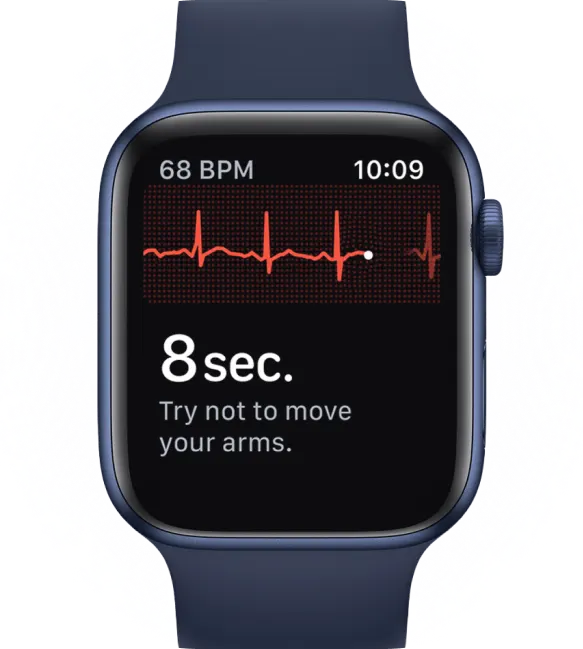
The recording takes 30 seconds. During that time, your goal is to reduce extra electrical noise from motion and muscle tension.
Try this:
- Sit down comfortably. A chair or couch is fine.
- Rest the arm wearing the watch on a table, desk, or your lap.
- Touch the Digital Crown with a finger from your opposite hand.
- Stay still for the full recording. Breathe normally and don’t talk if you can help it.
Why does this matter? Because your watch is trying to pick up tiny electrical signals from your heart. Tensing your arm, shifting your wrist, or fidgeting can interfere with that signal.
Practical rule: If you want a cleaner ECG, make your body boring for 30 seconds.
Common reasons a reading turns out poorly
People often blame themselves when a result looks odd. Usually, the problem is mechanical, not medical.
Watch for these common issues:
- Loose watch fit: If the back sensor isn’t making consistent contact, the tracing can become noisy.
- Wet skin or sweat: Moisture changes the contact between the sensor and your skin.
- Cold environment: The app has a specific operating range, and your body may also tense up when cold.
- Movement: Even small shifts can create artifact.
- Wrong timing: If symptoms have already passed, the rhythm may look normal by the time you record it.
If you get an unclear result, don’t panic. Recheck fit, dryness, and posture, then try again.
Understanding Common Apple Watch ECG Readings
When the result appears, the wording can feel more dramatic than it is. The best way to lower anxiety is to translate the app’s labels into plain language.
Sinus rhythm
Sinus rhythm is the result commonly hoped for. It means the watch sees a regular pattern that fits a normal heartbeat rhythm.
A simple way to think about it is this. Your heart has a natural conductor. When that conductor is leading the beat in an organized way, the rhythm is steady and coordinated. Sinus rhythm means the watch thinks that conductor is doing its job normally at that moment.
That result can be very reassuring, especially if you were worried by a random flutter. But it’s also just a snapshot. It reflects what your heart was doing during that recording, not every second before or after it.
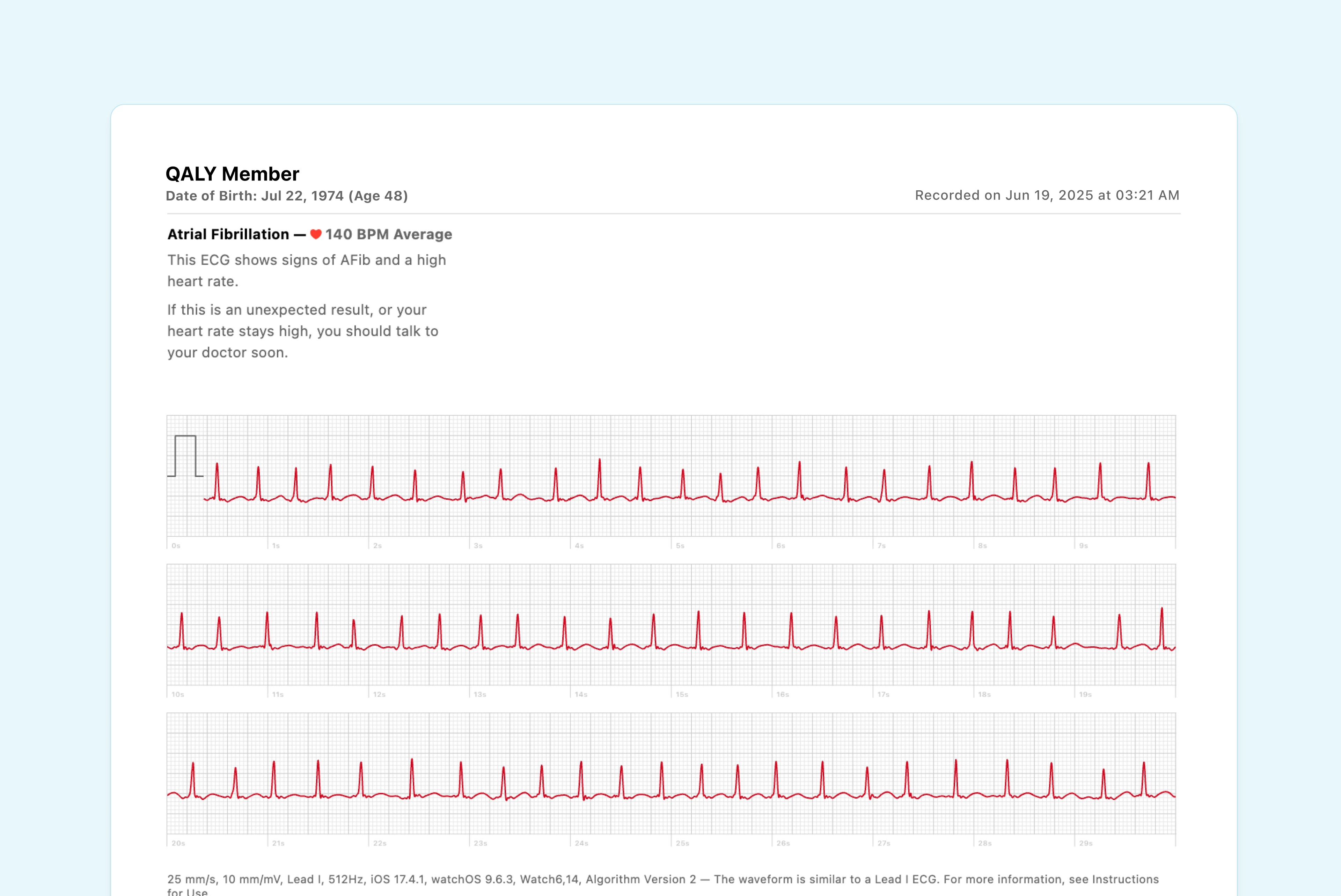
Atrial fibrillation
Atrial fibrillation, often called AFib, means the watch thinks your heartbeat pattern looks irregular in a specific way. The rhythm becomes less coordinated, like an orchestra playing without a clear conductor.
In Apple’s FDA clearance data, the app was over 98% accurate in detecting atrial fibrillation and 99.6% accurate in identifying its absence in readable recordings. But the same data also showed a positive predictive value of around 45%, which means false positives can happen, especially in younger people with a low baseline risk of AFib, as reported in this Stat News review of the clearance data.
That number matters emotionally as much as medically. A positive alert can feel like a firm diagnosis when it isn’t. It’s a flag that deserves attention, not a verdict.
An AFib result means “this needs a closer look,” not “you now know everything.”
Inconclusive and poor recording
These results frustrate people because they feel vague. But they usually mean the app couldn’t classify what it saw clearly enough.
That can happen for several reasons:
- Too much movement: Motion can distort the tracing.
- Weak contact: A loose band or dry-skin issue can reduce signal quality.
- Rhythm outside what the app is meant to label: The watch may record it without naming it.
- Signal noise: Electrical interference or muscle activity can muddy the line.
“Inconclusive” does not automatically mean something dangerous is happening. It often means the test conditions weren’t ideal or the rhythm doesn’t fit neatly into the app’s limited categories.

High or low heart rate messages
Sometimes the app adds context about rate. That doesn’t automatically point to a disease. It may describe what your heart was doing during the recording.
For people who want to better understand the shape of the tracing, including what the waves and intervals mean, this explainer on PQRST intervals on the Apple Watch ECG is a useful next step.
_apple.webp)
What Your Watch ECG Can and Cannot Tell You
The easiest way to understand the Apple Watch ECG is to picture a house.
If you look through one window, you can learn something real about what’s happening inside. You might see the lights are on, or that one room is empty, or that someone is moving around. But you still don’t see the whole house.
That’s what a single-lead ECG is like.


What it does well
The Apple Watch records a single-lead (Lead I) ECG. That makes it useful for rhythm monitoring, especially for possible AFib. Apple states that this format reached 98.3% sensitivity for detecting AFib in clinical evaluation, according to Apple’s ECG support information.
That’s why the device can be very helpful when your symptoms are brief and unpredictable. It gives you a way to capture a rhythm strip at home instead of hoping the problem appears during an office visit.
What it cannot do
A single lead has a built-in blind spot. It is not the same as a standard 12-lead ECG, which looks at the heart from multiple angles.
Apple also notes that this format cannot detect conditions that require multi-lead analysis, including a heart attack (myocardial infarction) or certain heart blocks visible on a 12-lead ECG. That distinction is one of the most important safety points for anyone using an ecg app for apple watch.
So if you have symptoms like chest pain, trouble breathing, fainting, or spreading discomfort, don’t rely on the watch to rule out something urgent.
Safety note: A normal watch ECG does not rule out every serious heart problem.
A better way to think about it
The watch is a rhythm checker, not a complete cardiac workup. It helps answer one narrow but useful question: “What was my heart rhythm doing right then?”
That’s valuable. It’s just not everything.
If you want a more grounded sense of where the Apple Watch ECG fits in the bigger picture, this breakdown of how accurate the ECG is on your Apple Watch adds helpful context.
From Data to Peace of Mind: The Power of Human Review
The hardest part for many people isn’t taking the ECG. It’s living with the unanswered question afterward.
You open the tracing. You zoom in. You compare it to screenshots online. Maybe the app says one thing, but your body says another. That gap between algorithm output and lived experience is where a lot of anxiety grows.

Why automated labels have limits
A study of 469 Apple Watch ECG recordings found that the watch’s automated interpretation had 81.08% sensitivity for detecting any abnormality. In that same study, manual interpretation achieved 100% sensitivity for detecting atrial fibrillation, according to the published analysis in PMC.
That difference tells an important story. Algorithms are good at pattern recognition within fixed categories. Human reviewers can look at the actual tracing, notice nuance, and judge whether the pattern fits something the watch may not label well.
This is especially relevant when your ECG doesn’t neatly fall into a simple bucket like “sinus rhythm” or “AFib.”
What human review adds
A trained reviewer can do more than just say whether a tracing looks normal or not. They can look at the rhythm strip itself and provide context.
That matters because people often want answers to questions like:
- Is this really AFib, or just an irregular-looking strip?
- Are there signs of another rhythm issue that the watch didn’t name?
- Do the intervals look normal enough, or do they need closer follow-up?
- Should I save this and show my doctor?
One option people use is Qaly, which lets users submit wearable ECGs for review by certified cardiographic technicians. That kind of service can help translate a confusing Apple Watch tracing into something more understandable and easier to track over time.
For a useful example of why automated tools alone can miss important ECG details, this write-up on what ChatGPT’s ECG reader missed shows the difference between pattern matching and trained interpretation.
Raw ECG data can lower uncertainty only if someone can interpret what the pattern actually means.
When this matters most
Human review becomes especially helpful in a few situations:
- Repeated symptoms with normal app labels: Your body may be sensing something the default classification doesn’t explain.
- Frequent inconclusive results: The tracing may still contain useful information even if the app won’t classify it.
- Medication or recovery monitoring: People often want more than a simple yes-or-no label.
- Pre-appointment preparation: A reviewed tracing can make a doctor visit more focused and productive.
For many people, the main benefit isn’t just accuracy. It’s relief. Not because every answer is good news, but because uncertainty finally starts turning into a plan.
Keeping Your Heart Data Private and Shareable
Health data feels personal because it is personal. If you’re recording your heart rhythm at home, it’s normal to wonder who can see that information and how much control you have over it.
Apple stores ECG recordings in the Health app on your iPhone, and sharing them is something you choose to do. That control matters, especially if you’ve already felt uneasy about how slowly or impersonally healthcare can sometimes work.
How to share an ECG with a clinician
If you want a doctor to see a recording, you don’t need to take a blurry screenshot. You can export a cleaner version directly from the Health app.
Use these steps:
- Open the Health app on your iPhone.
- Tap Browse, then go to Heart.
- Select Electrocardiograms (ECG).
- Choose the recording you want to share.
- Scroll and export a PDF for your doctor.
That PDF can make a real difference. It gives your clinician something concrete to review instead of relying only on your memory of what the episode felt like.
A privacy habit worth adopting
If you share ECGs through any app or service, take a minute to look at how that app handles account security, data access, and permissions. These crucial mobile app security best practices offer a practical checklist for thinking about privacy in plain language.
A good rule is simple. Share deliberately, review permissions, and keep copies of anything you may want to bring to future appointments.
Frequently Asked Questions About Apple Watch ECGs
What should I do if I get an AFib alert at night
Start by staying calm. Sit down, notice how you feel, and save the recording. If you have severe symptoms such as chest pain, fainting, major shortness of breath, or feel acutely unwell, seek urgent medical care instead of watching and waiting.
If you feel okay, it’s reasonable to keep the ECG for follow-up and get it reviewed. The alert is important, but it isn’t the same thing as a complete diagnosis.
Why is my ECG app missing or unavailable
Regional regulation is the main reason. The ECG app’s availability is restricted by local health rules, which affects users outside the US and parts of Europe. Major markets like India have lacked official clearance for years, and workarounds can be unreliable, according to this overview of regional ECG app restrictions and global analysis options.
That’s frustrating, especially if you already own the watch and assume the feature should work everywhere.
Can I trust one normal result
A normal result can be reassuring, but it only reflects that moment. If your symptoms come and go, a single normal tracing doesn’t always explain what happened earlier or what may happen later.
That’s why timing matters so much. The most useful recordings are often the ones taken while symptoms are happening or immediately after.
Why does the app keep saying inconclusive
Usually it’s a recording quality issue, not proof that something is seriously wrong. Recheck fit, dryness, posture, and movement. If the problem keeps happening and you also feel symptoms, save the strip and get another set of eyes on it.
Does the watch replace a doctor
No. It helps you collect rhythm data at home. That can make care faster, smarter, and more specific, but it doesn’t replace professional assessment when symptoms are significant or persistent.

Turn a confusing ECG strip into something you can actually understand. Upload yours to Qaly for expert review.



.png)
.png)