




If you already use the ECG app on your Apple Watch, you may wonder whether Qaly is another version of the same thing. It is not.
The Apple Watch ECG app records your ECG. It uses the sensors in your watch to capture a 30-second, single-lead tracing and gives you a focused first result. Qaly works with the ECG after it has been recorded. It automatically syncs your Apple Watch ECGs and shows PQRST values for free. HRV insights and ECG reviews, including human review, require a subscription.
So this is not a direct comparison between two apps that do the same job. It is better understood as one connected workflow: record with Apple Watch, then analyze and review with Qaly.
The short version
| Step | Apple Watch ECG app | Qaly |
|---|---|---|
| Primary job | Records your ECG from the watch | Analyzes and explains the saved ECG |
| How the ECG arrives | Captured with the watch sensor and saved to Apple Health | Automatically syncs from Apple Health after permission is granted |
| Automatic information | Average heart rate and a focused rhythm classification | Free PQRST values; subscription plans add HRV, rhythm reviews, and trends |
| Human review | Not included in the ECG app | Available with a subscription, either as a fallback or for every ECG |
| Best way to use it | Take the ECG when you feel a symptom or want to check your rhythm | Understand the recording in more detail and keep reviewed results together |
Primary job
How the ECG arrives
Automatic information
Human review
Best way to use it
How Apple Watch and Qaly work together
- Take an ECG on your Apple Watch. Open Apple's ECG app, rest your arm, and hold a finger on the Digital Crown for 30 seconds.
- The recording is saved to Apple Health. Apple stores the waveform, average heart rate, classification, and any symptoms you add.
- Qaly automatically syncs the ECG. Once Qaly is connected to Apple Health and has your permission, the recording appears in Qaly without a manual PDF upload.
- See free measurements or subscribe for more. Qaly automatically shows PQRST values for free. HRV insights, automatic ECG reviews, and human ECG reviews are available through paid subscription plans.
This is the main distinction the article needs to make. Apple Watch creates the recording. Qaly adds another layer of information to that same recording.
What the Apple Watch ECG app gives you
The Apple Watch ECG app uses the electrical heart sensor in supported Apple Watch models to create an ECG similar to a single-lead, Lead I tracing. It is a convenient way to capture what your rhythm is doing while you are feeling a palpitation or another symptom.
After the 30-second recording, the app shows your average heart rate and a classification. Depending on the ECG app version and the recording, Apple may show sinus rhythm, atrial fibrillation (AFib), high or low heart rate, inconclusive, or poor recording.
The Apple ECG app is intentionally focused. Its key strengths are recording a readable ECG from your wrist and checking classifiable recordings for sinus rhythm or AFib. It also lets you add symptoms and export the original ECG as a PDF from Apple Health.
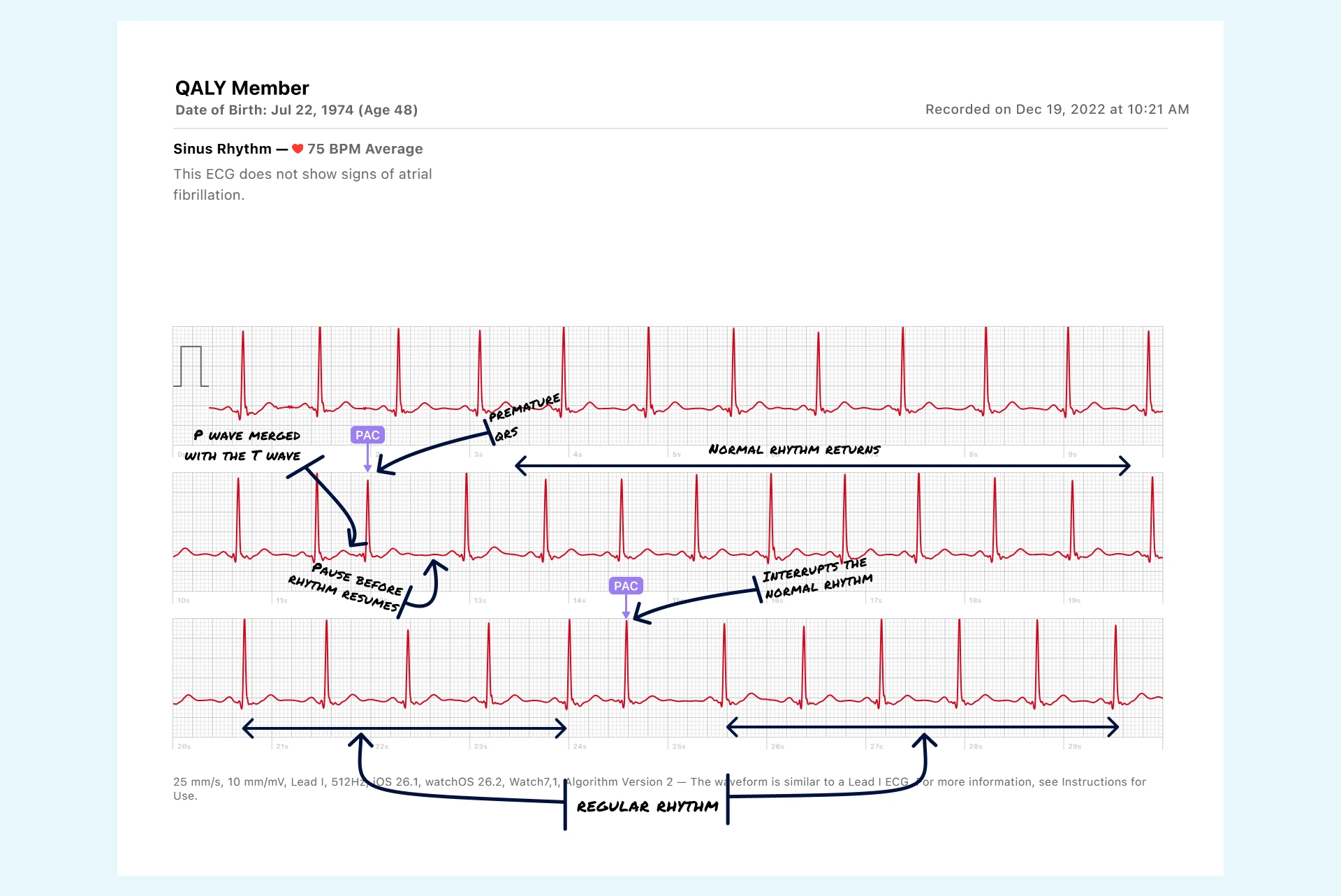
What it does not do is provide a full explanation of everything visible in the tracing. For example, it does not automatically report PR, QRS, and QTc measurements or name every type of premature beat and rhythm pattern.
What Qaly adds to your Apple Watch ECG
Automatic syncing from Apple Health
You do not need to export every Apple Watch ECG and upload it into Qaly manually. The Qaly iPhone app integrates with Apple Health. After you grant access, your Apple Watch ECGs automatically appear in Qaly.
This keeps the workflow simple. Record on your wrist as usual, then open Qaly when you want to see the additional analysis or request a review.
More information from the same recording
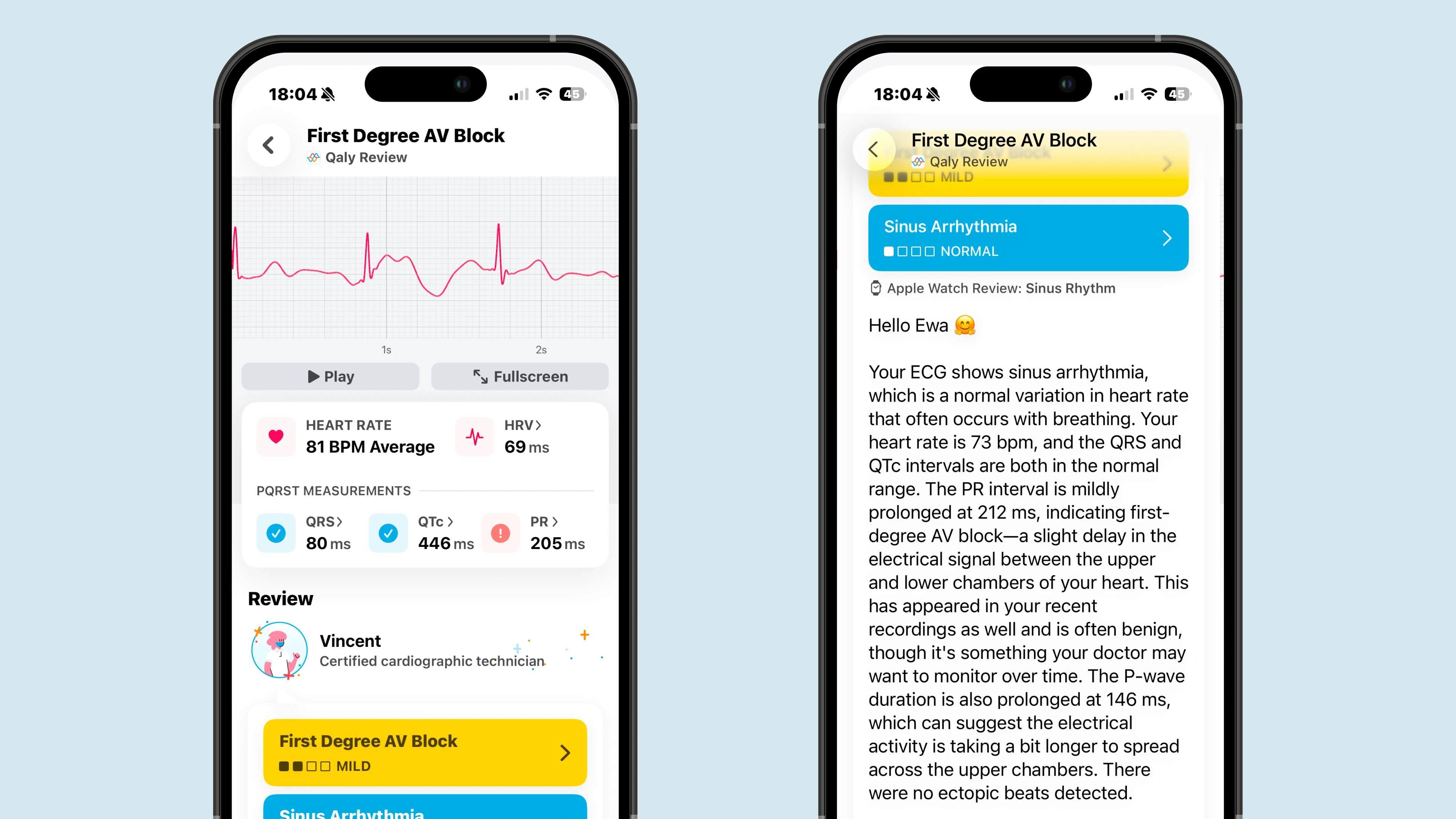
For free, Qaly automatically shows PQRST values, including PR, QRS, and QTc measurements, from the ECG that Apple Watch recorded. HRV insights require a subscription.
With a review subscription, Qaly can add rhythm findings such as sinus rhythm, sinus bradycardia, sinus tachycardia, AFib, atrial flutter, supraventricular tachycardia (SVT), premature ventricular contractions (PVCs), premature atrial contractions (PACs), AV blocks, ventricular tachycardia, and Wolff-Parkinson-White (WPW). Reviews can also describe patterns such as bigeminy, trigeminy, and couplets.
Subscription reviews are delivered as written messages. A review can use context you have provided, including your previous ECG history, notes, and reported symptoms. This is different from receiving only a short classification attached to the current tracing.
Human review when you want another set of eyes
Apple's built-in ECG app does not include a service where a person reviews each recording. You can export the Apple PDF and send it to your own healthcare professional, but that happens outside the ECG app.
Qaly adds human review inside the product through its subscription plans. With Qaly Human, a certified cardiographic technician reviews every ECG. With Qaly Automatic, the ECG is reviewed automatically and a technician steps in when the automatic system cannot review it.
This human layer is especially relevant when the watch result feels too limited, your symptoms do not seem explained by the label, or you want a reviewed report to organize before speaking with your doctor.
Get your ECG checked by certified experts within minutes on the Qaly app.


It is the same ECG, with different layers of information
Qaly does not create a second or better-quality ECG. It analyzes the same single-lead recording captured by your Apple Watch. This means the two apps are not competing over which one records your heart more accurately. Only the Apple Watch hardware captured the signal.
The difference is what happens next:
- Apple's layer: the waveform, average heart rate, and focused classification.
- Qaly's free layer: automatically synced ECGs with PQRST values.
- Qaly's subscription layer: HRV insights, automatic rhythm reviews, premature-beat insights, trends, and contextual review messages.
- Qaly's human layer: verification by a certified cardiographic technician through a review subscription.
Thinking in layers avoids a misleading question such as “Which app should I record with?” If you use an Apple Watch, you still record with Apple's ECG app. The choice is whether you want Qaly to add more analysis and review afterward.
What Qaly cannot change about the recording
Qaly can add analysis, but it cannot recreate signal that the watch failed to capture. If the ECG contains heavy movement, weak skin contact, or electrical interference, the best next step may be to record another ECG.
Both the Apple result and Qaly's analysis are also based on a single-lead wearable ECG. A single lead can provide useful rhythm information, but it is not the same as the 12-lead ECG used in clinical care. Apple specifically notes that its ECG app cannot detect a heart attack and is not designed to identify every heart condition.
If you have chest pain, severe shortness of breath, fainting, or symptoms that may indicate an emergency, do not wait for a watch or app result. Contact emergency services.
When the Apple Watch ECG app may be enough
You may not need an additional analysis service for every ECG. Apple's built-in app may give you what you need when:
- you mainly want to capture a 30-second ECG during symptoms;
- you are following a monitoring plan created with your clinician;
- you only need the original waveform to share with your doctor; or
- you do not want additional measurements or human review.
When adding Qaly may be useful
Qaly may be useful on top of Apple Watch when:
- Apple labels the ECG inconclusive and you want more information from the tracing;
- you feel premature beats or palpitations that are not explained by Apple's label;
- you want PR, QRS, and QTc measurements;
- you want to track rhythms, intervals, HRV, or premature beats over time with a subscription;
- you want the review to consider your ECG history, notes, and symptoms;
- you want a certified technician to review the ECG; or
- you also use ECG devices outside the Apple ecosystem.
Frequently asked questions
Does Qaly replace the Apple Watch ECG app?
No. The Apple Watch ECG app records the ECG using the watch hardware. Qaly then shows additional measurements from that saved recording, while ECG reviews are available with a subscription. They perform different parts of the same workflow.
Do Apple Watch ECGs automatically sync to Qaly?
Yes. After you connect Qaly to the Apple Health app and grant permission, Apple Watch ECG recordings automatically appear in Qaly. You do not need to export and upload every Apple Watch ECG manually.
What information does the Apple Watch ECG app provide?
The app records a 30-second single-lead ECG, shows your average heart rate, and provides a focused classification such as sinus rhythm, AFib, high or low heart rate, inconclusive, or poor recording.
What information does Qaly add?
For free, Qaly automatically shows PQRST values, including PR, QRS, and QTc. With a subscription, Qaly adds HRV insights and can provide findings such as sinus rhythm, sinus bradycardia, sinus tachycardia, AFib, atrial flutter, SVT, PVCs, PACs, AV blocks, ventricular tachycardia, and WPW. Reviews can also describe bigeminy, trigeminy, and couplets and can consider your history, notes, and symptoms.
Can a human review my Apple Watch ECG in Qaly?
Yes, with a subscription. On Qaly Human, a certified cardiographic technician reviews every ECG. On Qaly Automatic, reviews are performed automatically, with human review when the automatic system cannot review the recording.
Can Qaly review an inconclusive Apple Watch ECG?
With a review subscription, Qaly can analyze an Apple Watch ECG that Apple labeled inconclusive and may provide more information about the tracing. If the recording has too much noise or too little usable signal, another recording may still be needed.
Final verdict
The Apple Watch ECG app and Qaly are not true alternatives. Apple Watch is the recording tool. It captures the ECG and gives you a useful first classification. Qaly works with the recording Apple already created, showing PQRST values for free and adding HRV insights and ECG reviews through its subscription plans.
For many people, the clearest workflow is simple: take the ECG with Apple Watch, let it sync automatically to Qaly, check the free measurements, and subscribe when you want an ECG review.
Get your Apple Watch ECG analyzed automatically and reviewed by certified experts on the Qaly app.


