


Amazing comfort for anyone struggling with heart issues.
Qaly help
A little help. A clearer next step.
Find answers to common questions and explore ways to get more from your ECG recordings.
About Qaly
What is Qaly?
Qaly is an iPhone and Android app that gets the ECGs from your smartwatch or home ECG device read by certified cardiographic technicians, usually within minutes. It works with the Apple Watch, Samsung Galaxy Watch, Fitbit, KardiaMobile, Withings and more. Qaly was co-founded by Dr. Marco Perez, a Stanford cardiac electrophysiologist, and has read more than 500,000 ECGs.
Qaly is pronounced “Qualee”, as in quality of life. See everything Qaly does.
Who reads my ECG on Qaly?
Certified cardiographic technicians read your ECGs on Qaly. They are health professionals, like cardiac nurses, trained to read heart rhythms from ECGs in hospitals, and every technician on Qaly has passed the CCT exam from Cardiovascular Credentialing International. They read ECGs 24 hours a day, 7 days a week.
On the Automatic plan, Bobby, Qaly’s AI, reviews your ECGs first, and a technician reviews any recording Bobby can’t read.
Which devices work with Qaly?
Qaly works with ECGs from the Apple Watch, Samsung Galaxy Watch, Fitbit, KardiaMobile, Withings, Wellue, Garmin and WHOOP, and the app runs on both iPhone and Android. Apple Watch ECGs come in automatically through the Health app. For other devices, Qaly walks you through exporting each recording and adding it.
What heart rhythms does Qaly check for?
Qaly’s certified cardiographic technicians check each ECG for 33 heart rhythms, including atrial fibrillation (AFib), atrial flutter, supraventricular tachycardia (SVT), ventricular tachycardia, PVCs, PACs, heart block and Wolff-Parkinson-White syndrome. Qaly also measures your PR, QRS and QTc intervals automatically, for free, when the recording is clear enough.
Look up any of these terms in the ECG glossary.
Is a Qaly review a medical diagnosis?
No. A Qaly review gives you information about your ECG, not a medical diagnosis. Talk to your doctor about your results, and share your Qaly report with them. If you feel unwell or think you may be having a medical emergency, call 911 or your doctor right away instead of waiting for a review.
How much does Qaly cost?
Qaly is free to download, and ECG reviews come with a subscription, billed monthly or annually. The Human plan sends your ECGs to certified cardiographic technicians. The Automatic plan gives unlimited instant AI reviews and uses a technician only when the AI can’t read a recording. In many countries you can start with a free trial and cancel anytime.
See current prices on the pricing page.
Smartwatch ECGs
How do I take an ECG with my Apple Watch?
Open the ECG app on your Apple Watch, rest your arms on a table or in your lap, and hold a finger on the Digital Crown without pressing it. Stay still for 30 seconds until the countdown ends, then review your result. The recording is saved to the Health app on your iPhone, where Qaly picks it up for a review.
Read the full guide: How to Take an ECG with Your Apple WatchWhat does “Inconclusive” mean on my Apple Watch ECG?
Inconclusive means your Apple Watch couldn’t classify the recording. Common causes are a weak signal from the way the ECG was taken, a heart rate between 100 and 120 bpm without AFib, a pacemaker or ICD, or a rhythm the ECG app isn’t designed to recognize, such as PACs or PVCs. A certified technician on Qaly can still read an inconclusive ECG.
Read the full guide: What Inconclusive ECG Means on Your Apple WatchWhy does my Apple Watch ECG say “Poor Recording”?
Poor Recording means the signal from your Apple Watch’s ECG sensor was too noisy for the watch to make sense of it. To avoid it, sit down, take a few deep breaths, rest your arms on a table or in your lap, and fasten the watch snugly so its back touches your skin. Then record again.
Read the full guide: What Poor Recording ECG Means on Your Apple WatchWhat do “High Heart Rate” and “Low Heart Rate” mean on my Apple Watch ECG?
They mean your heart rate was outside the range the Apple Watch ECG app can classify, so it couldn’t label the rhythm as sinus rhythm or AFib. The watch shows Low Heart Rate below 50 bpm, and High Heart Rate above 120 bpm on ECG version 1 or above 150 bpm on version 2. A certified technician on Qaly can still read these ECGs.
Read the full guide: What High Heart Rate ECG Means on Your Apple WatchWhat does “Sinus Rhythm” mean on my watch ECG?
Sinus rhythm is the rhythm of a normal, healthy heart. It means each heartbeat’s electrical signal starts in the sinus node, your heart’s natural pacemaker, and moves properly through the rest of the heart. On an ECG it shows a regular beat with a normal P wave before each QRS complex, typically at 60 to 100 beats per minute.
Read the full guide: What Sinus Rhythm Looks Like on Your Watch ECGCan an Apple Watch detect AFib?
Yes. An Apple Watch can detect possible signs of atrial fibrillation (AFib) in two ways: Irregular Rhythm Notifications check your rhythm in the background with the optical heart sensor, and the ECG app records a 30-second single-lead ECG when you hold the Digital Crown. Treat it as an alert rather than a diagnosis, and talk to your doctor about the results.
Read the full guide: Can Apple Watch Detect AFib? Your Guide to Heart HealthHow accurate is the Apple Watch ECG?
The Apple Watch ECG is accurate for what it was designed to find: atrial fibrillation. In one study it correctly detected AFib in 84% of cases compared with a 12-lead ECG. It has limits, though: many people report AFib results they turn out not to have, it shows Inconclusive for many other rhythms, and it doesn’t diagnose.
Read the full guide: How Accurate the ECG Is on Your Apple WatchCan a smartwatch ECG show PVCs or PACs?
Yes. Extra beats such as premature atrial contractions (PACs) and premature ventricular contractions (PVCs) can show up on a smartwatch ECG, but the Apple Watch ECG app doesn’t label them and often calls those recordings Inconclusive. Qaly’s certified cardiographic technicians look for PACs and PVCs in every ECG they read.
Read the full guide: What Premature Ventricular Contractions (PVCs) Look Like on Your Watch ECGCan a smartwatch ECG detect a heart attack?
Not reliably. A heart attack is a blockage in the blood vessels around the heart, and although it occasionally shows up on a single-lead watch ECG, a watch can’t be relied on to tell whether you’re having one. If you have chest pain or think you may be having a heart attack, call 911 right away instead of taking an ECG.
Read the full guide: The Ultimate Cardiologist’s Guide to the Smartwatch ECGIs a smartwatch ECG as good as a 12-lead ECG?
No. A smartwatch records one lead, called lead I, while the ECG at your doctor’s office records 12 leads from different angles. One lead still shows a lot about your heart rhythm, but it usually can’t rule out structural heart problems, and it isn’t used to check for a stroke or lung problems. For those, your doctor needs a full multi-lead ECG and other tests.
Read the full guide: The Ultimate Cardiologist’s Guide to the Smartwatch ECG
Subscription and billing
How do I cancel my subscription?
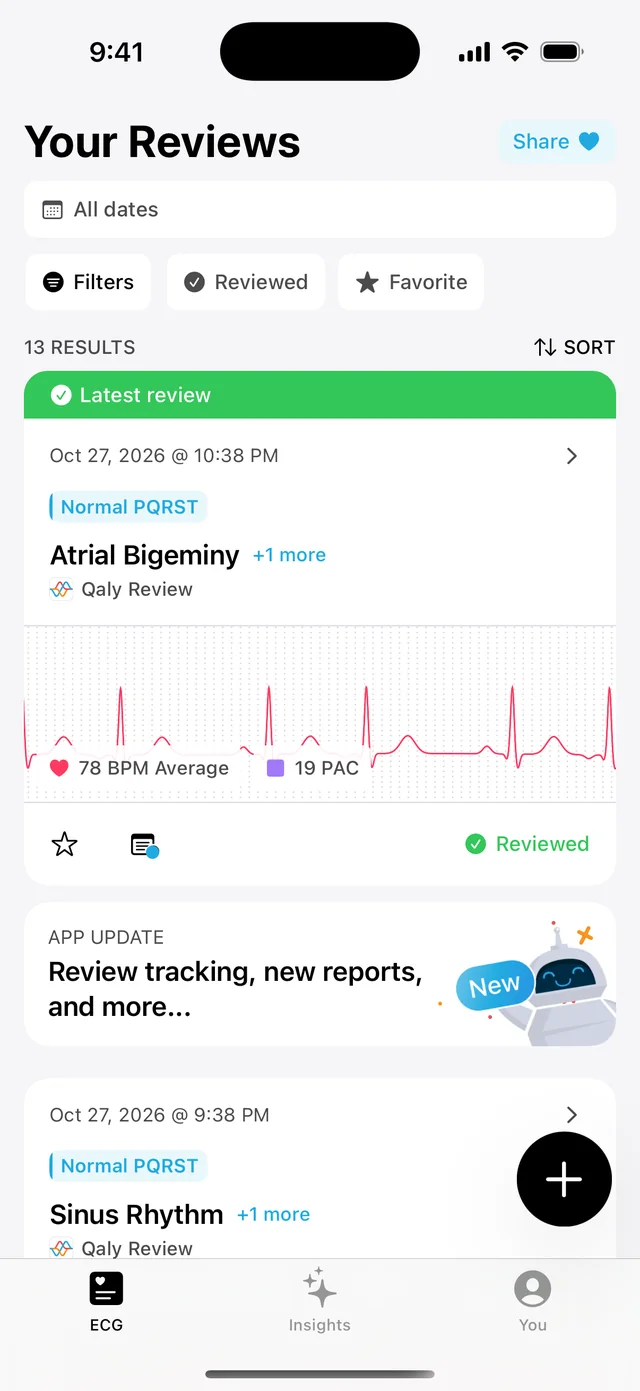
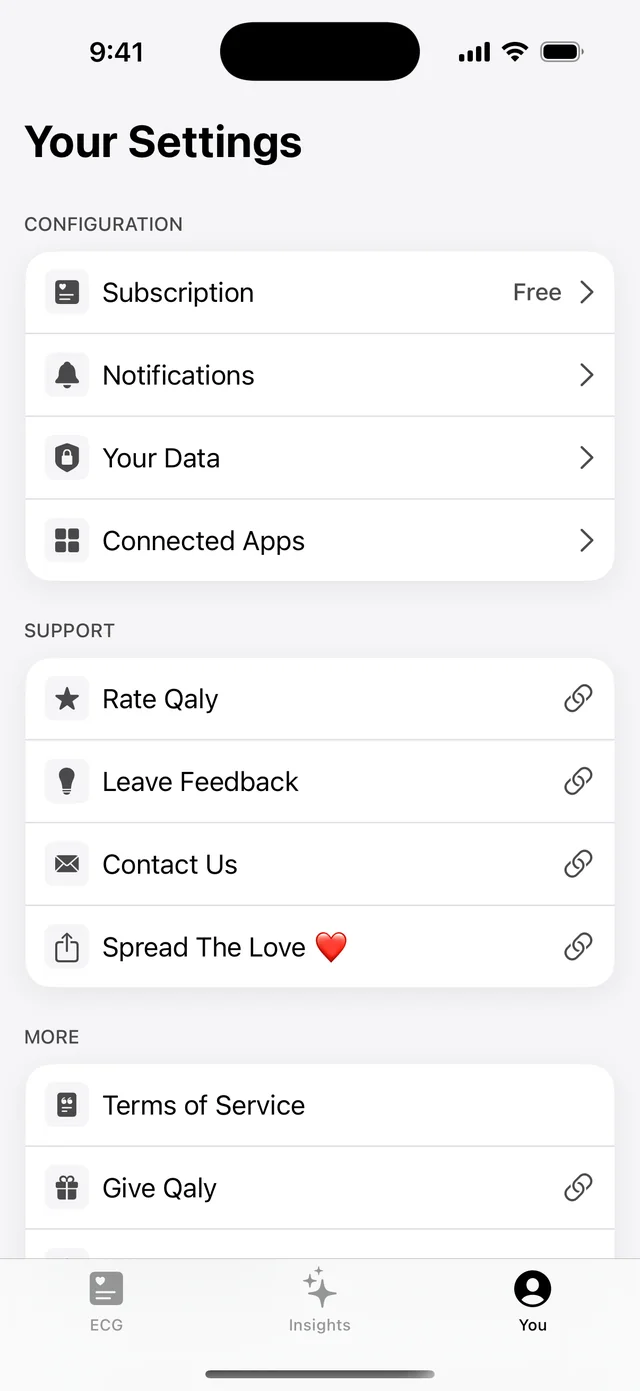
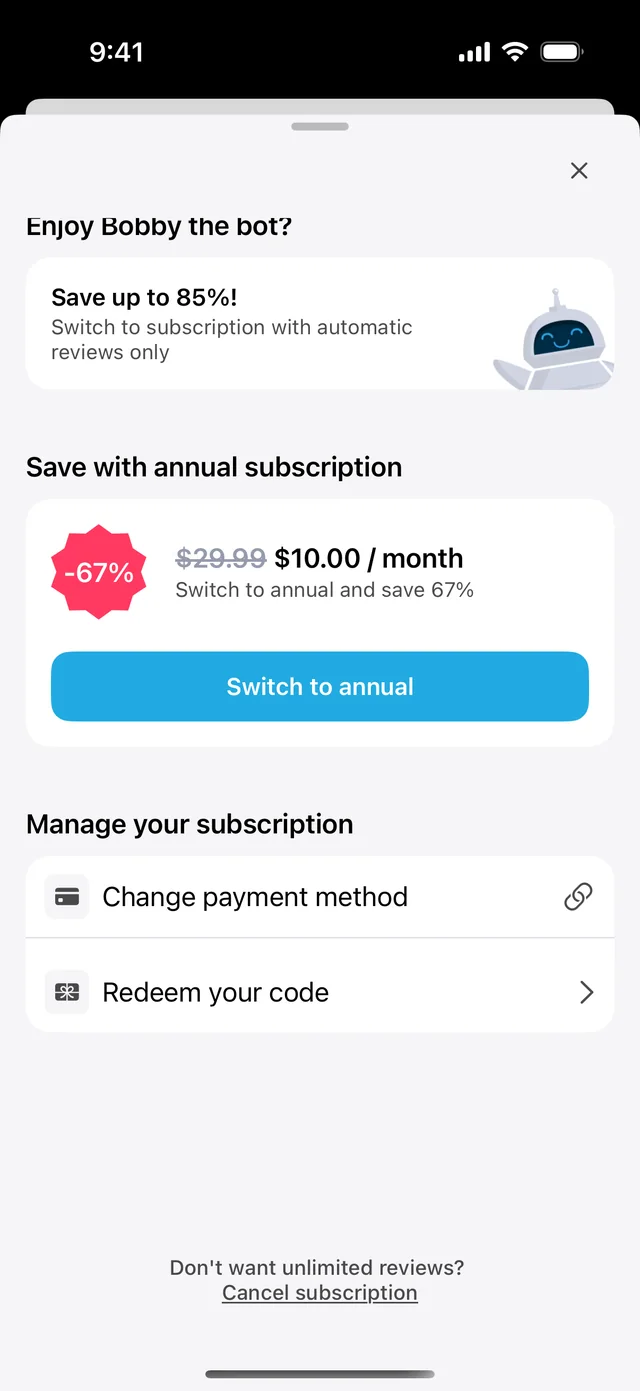
You can cancel your Qaly subscription yourself in the Qaly app: tap You, then Subscription, then Cancel subscription at the bottom of the screen. You keep your unlimited reviews until the end of the billing period you’ve already paid for. You can also email support@qaly.co from the address you were billed with and ask us to cancel.
Tap You in the bottom-right corner.
Tap Subscription.
Scroll to the bottom and tap Cancel subscription, next to “Don’t want unlimited reviews?”, then follow the steps on screen.
If you email support@qaly.co to cancel, we’ll reply with a secure link to confirm the cancellation. The link works once and expires after 24 hours.
Does deleting the app cancel my free trial or subscription?
No. Deleting the Qaly app doesn’t cancel a free trial or subscription, because Qaly subscriptions are billed by Qaly, not through the App Store or Google Play. Your trial keeps renewing until you cancel it in the Qaly app, under You, then Subscription, or ask support@qaly.co to cancel it for you.
Why did I get a “payment to Qaly was unsuccessful” email?
It means your Qaly subscription tried to renew, but your card was declined, so no money was taken. If you don’t want to keep Qaly, reply to that email or write to support@qaly.co and we’ll cancel the subscription so you won’t be charged.
ECGs and reviews
Why aren’t my Apple Watch ECGs showing up in Qaly?
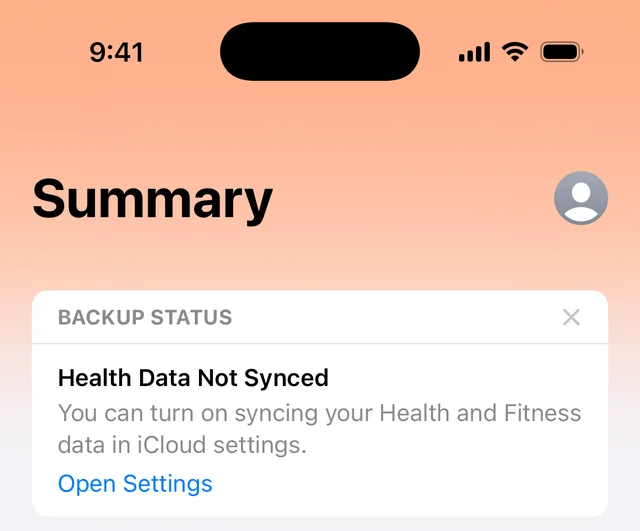
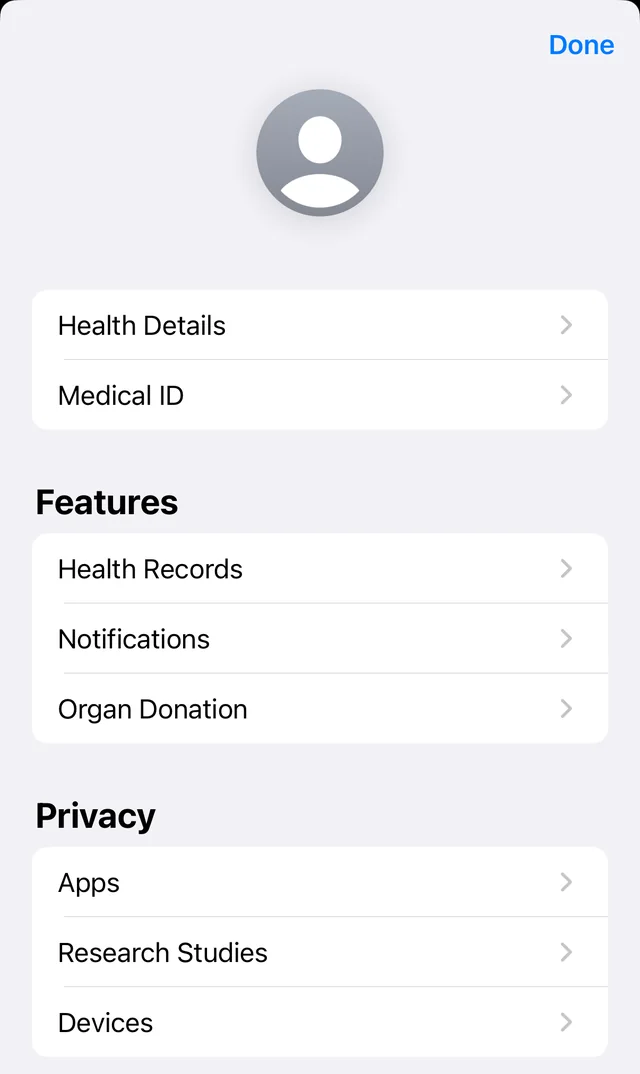
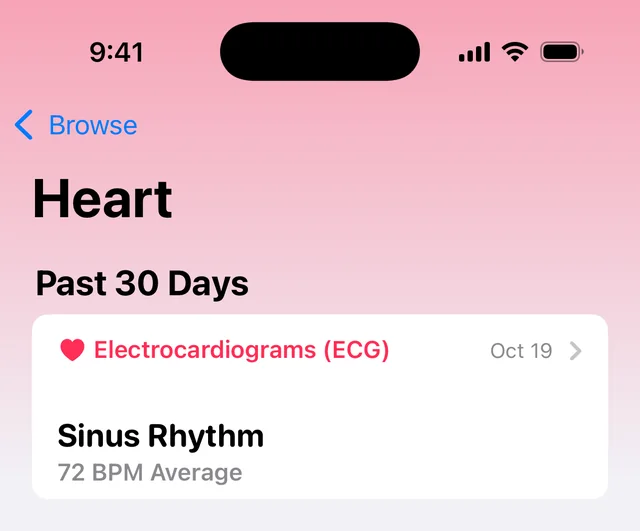
Qaly gets Apple Watch ECGs through the Health app on your iPhone, so they only appear once Qaly has permission to read them. In the Health app, tap your profile picture, then Apps under Privacy, choose Qaly, and turn on Electrocardiograms. If a recording is in Health but still not in Qaly, restart your iPhone or email support@qaly.co.
Open the Health app and tap your profile picture in the top-right corner.
Under Privacy, tap Apps. Choose Qaly and make sure Electrocardiograms is turned on.
Check that the recording is in Health: go to Browse, then Heart, then Electrocardiograms (ECG).
Still not showing up? Turn your iPhone off, wait a few seconds, and turn it back on. If a recording is in Health but not in Qaly after that, email support@qaly.co and we’ll take a look.
How do I add ECGs from Kardia, Samsung, Fitbit, or another device?
In the Qaly app, open the ECG tab, tap +, and choose your device. Qaly walks you through exporting the recording from Kardia, Samsung Galaxy Watch, Fitbit, Withings, Wellue and other devices and bringing it in. Using a device that isn’t listed? Email support@qaly.co and we’ll help you get your recordings into Qaly.
On the ECG tab, tap +.
Choose the device you use. Qaly walks you through exporting your ECG and bringing it in.
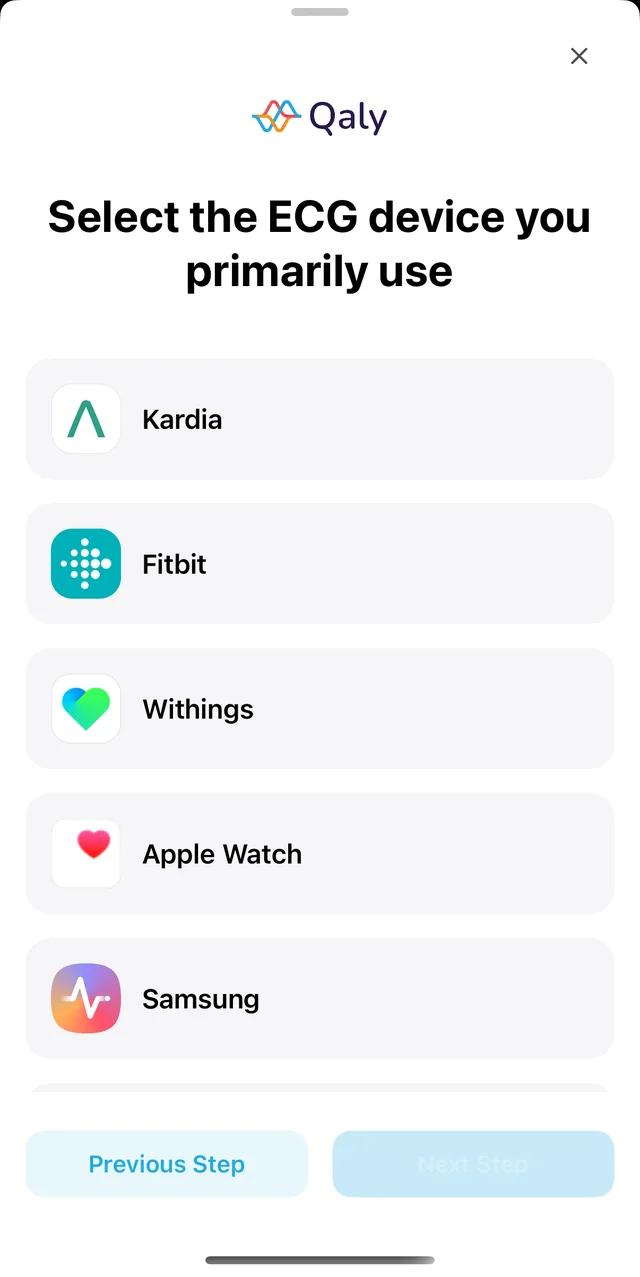
Our step-by-step guides also show where to find the export option in each device’s own app:
How long does it take to get my ECG read?
Automatic reviews by Bobby, Qaly’s AI, take a few seconds. Reviews by Qaly’s certified cardiographic technicians happen day or night, and most arrive within minutes. While you wait, the Qaly app shows how many ECGs are ahead of yours in the queue, and it sends a notification as soon as your review is ready.
Make sure notifications for Qaly are turned on in your phone’s settings, so you see the notification. If a review is taking much longer than usual, email support@qaly.co.
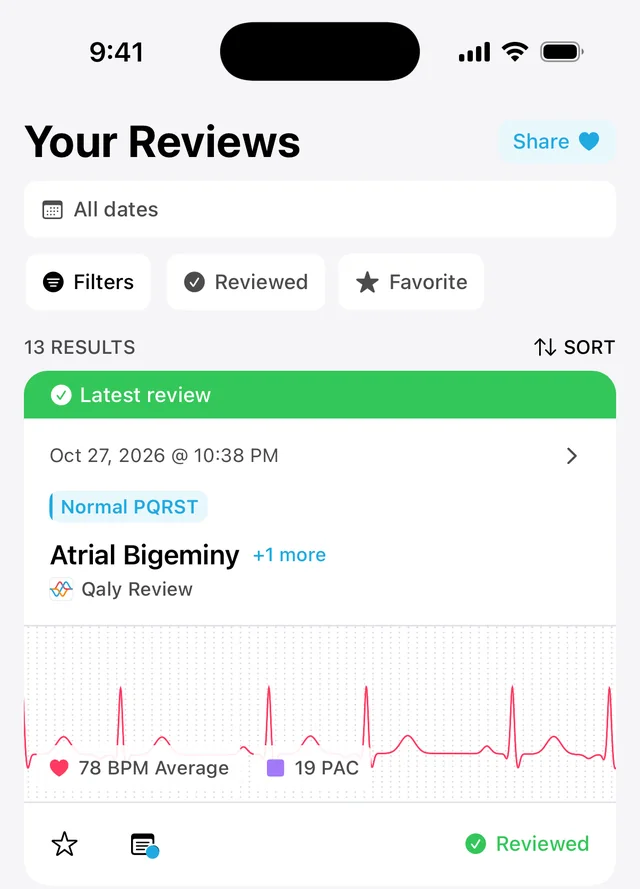
Reviewed ECGs are marked Reviewed in your list. Why couldn’t my ECG be read or measured?
Movement or a weak signal can make an ECG too noisy to read, and Qaly leaves out PR, QRS or QTc values when it can’t measure them accurately. A missing value doesn’t mean something is wrong. Recording again while sitting still, with your arms resting and the watch snug on a clean, dry wrist, usually gives a clearer ECG.
For a clearer recording next time:
- Sit down and rest your arms on a table.
- Keep still and relaxed while you record.
- Wear your watch snugly on the wrist you chose in its settings.
- Make sure your skin and the sensors are clean and dry.
Learn more about what a poor recording means.
Account and sign-in
Which email address is my Qaly account using?
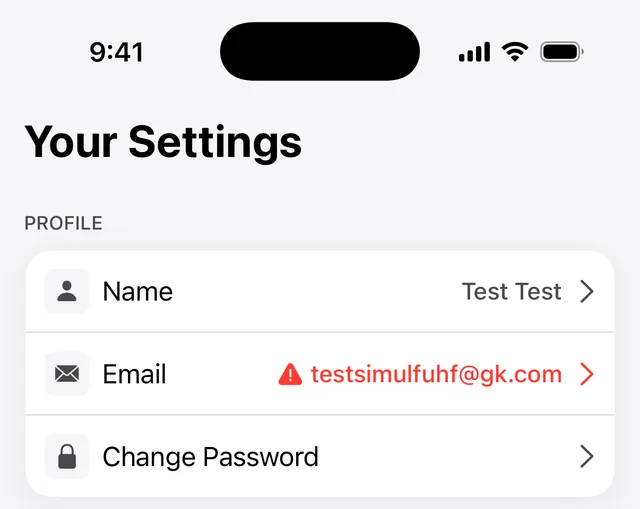
Your Qaly login email is shown in the Qaly app: tap You in the bottom-right corner, and it’s listed under Profile at the top. Include that address whenever you contact support@qaly.co, so we can find your account quickly.
Open the Qaly app and tap You in the bottom-right corner.
Your login email is shown under Profile, at the top.
Why do I have two Qaly accounts?
You usually have two Qaly accounts because you signed up once with Sign in with Apple, which can share a private relay address instead of your real email, and later signed in with your regular email, which created a second account. Email support@qaly.co with both addresses and we’ll help you sort it out.
Read more about Apple’s private relay addresses.
I didn’t get my verification email. What should I do?
You can send yourself a new verification link from the Qaly app: tap You, then Email, then Send verification link, and check your inbox, including your spam or junk folder. A red warning next to Email means your address isn’t verified yet. If the email still doesn’t arrive, write to support@qaly.co with the address you’re verifying.
Tap You in the bottom-right corner.
Tap Email. A red warning next to it means your address isn’t verified yet.
Tap Send verification link, then check your inbox, including your spam or junk folder.
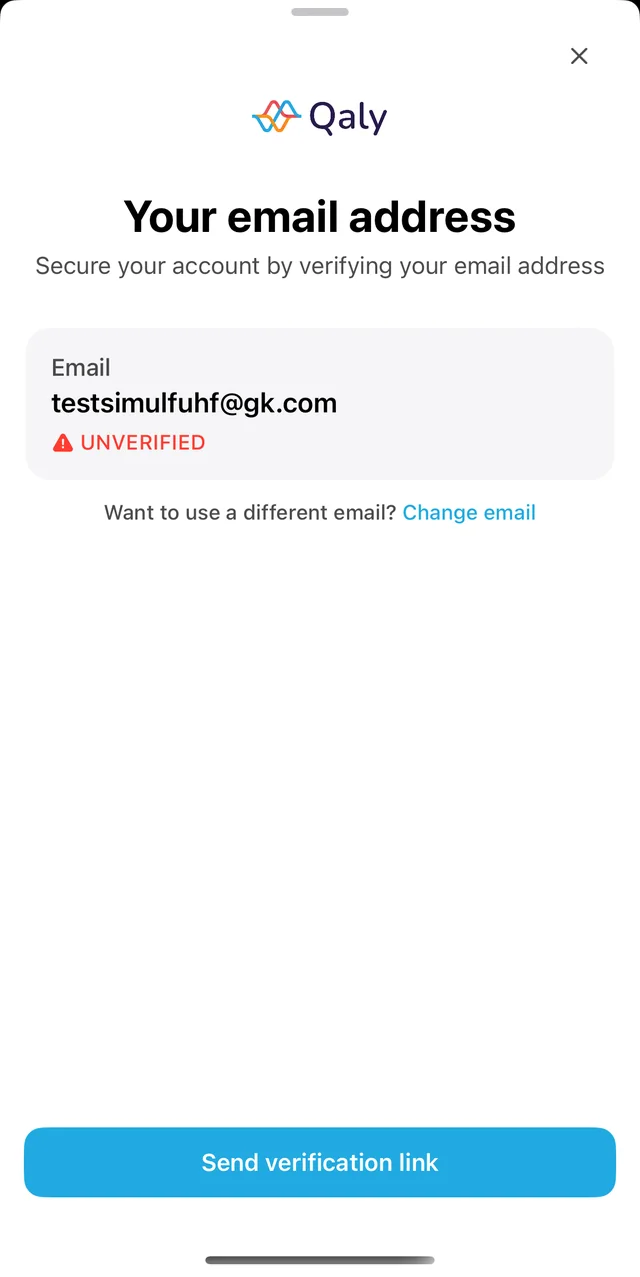
Is the address wrong? Tap Change email on the same screen.
Reports and your data
How do I create a Qaly report for my doctor?
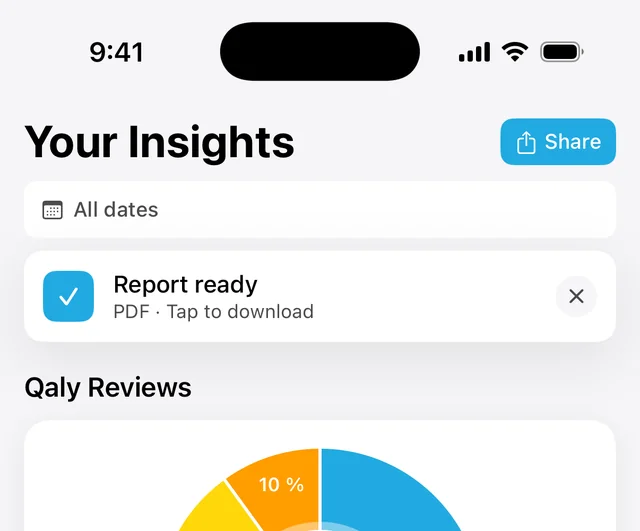
You can create a PDF report for your doctor in the Qaly app: tap Insights, then Share, choose the timeframe and what to include, and tap Generate report. Qaly builds the report in the background, and when it’s ready it appears at the top of Insights for you to download and share.
Tap Insights at the bottom of the screen.
Tap Share in the top-right corner.
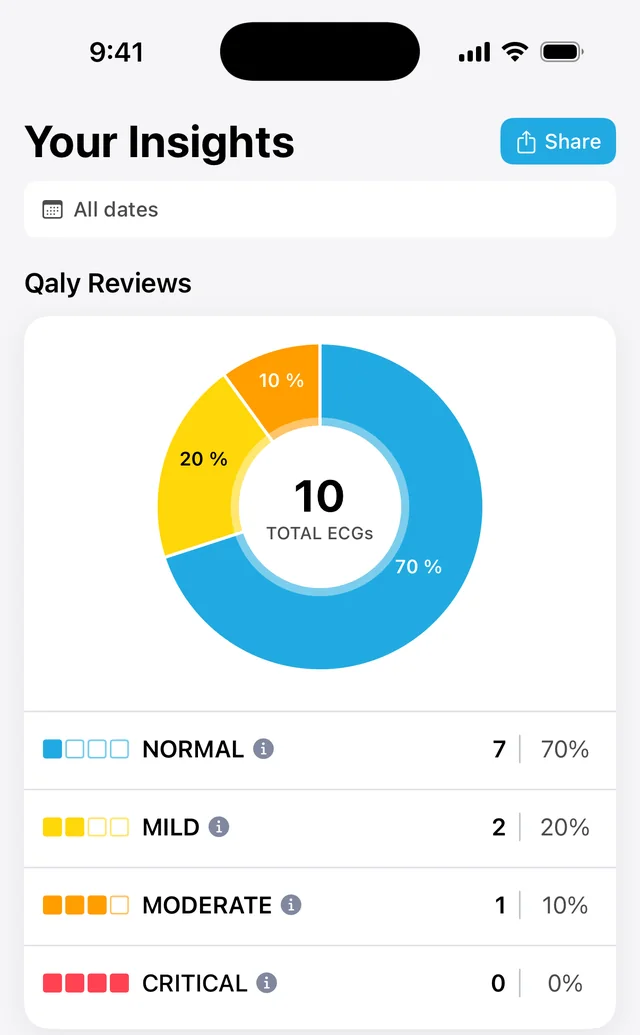
Choose the timeframe and what to include, then tap Generate report.
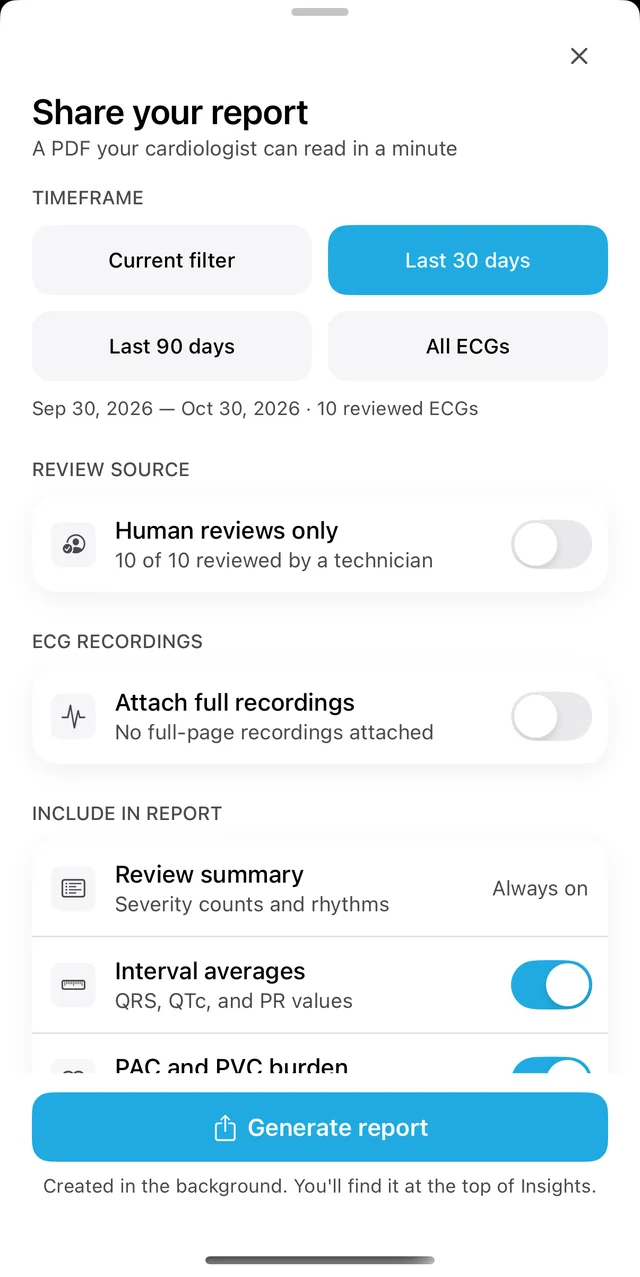
The report is created in the background, which can take a little while if you include a lot of ECGs. When it’s ready, it appears at the top of Insights. Tap it to download it.
How do I delete my account and data?
You can delete your Qaly account yourself in the app: tap You, then Your Data, then Delete my account. This permanently removes your account, your ECGs and technicians’ reviews, and it can’t be undone. To remove only your ECGs, tap Delete all ECGs instead. You can also ask support@qaly.co to delete your account.
Tap You in the bottom-right corner.
Scroll down and tap Your Data.
Tap Delete my account and follow the steps on screen.
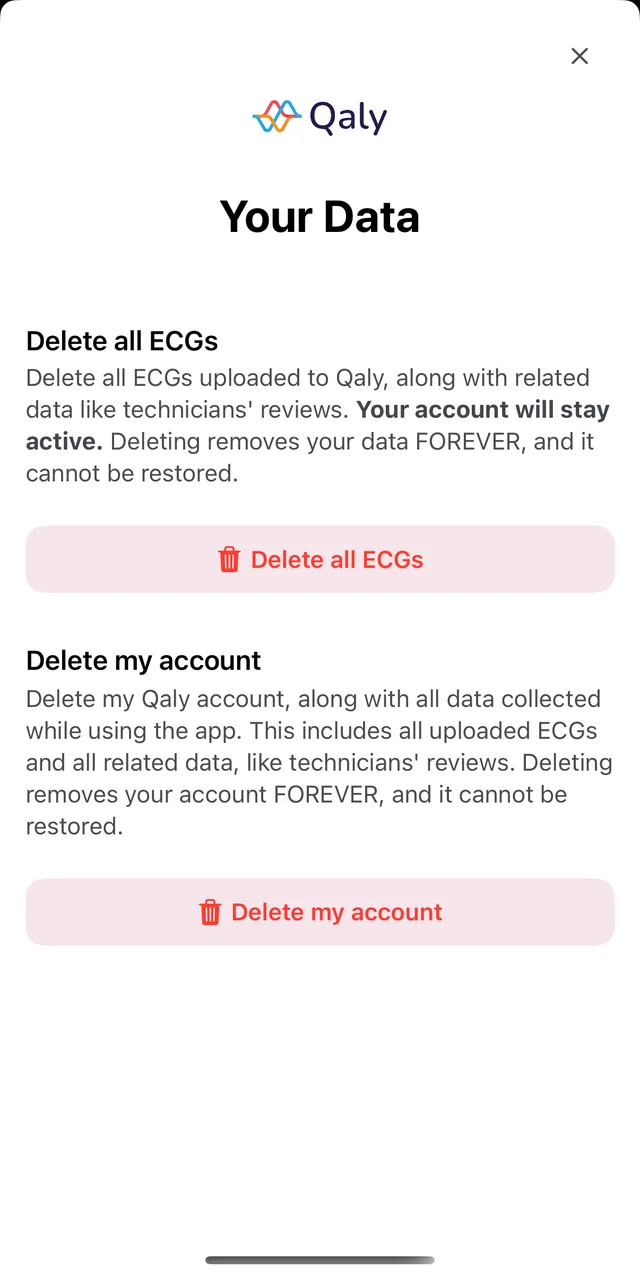
If you tap Delete all ECGs instead, your account stays active.
You can also email support@qaly.co from the email address on your account and ask us to delete it. We’ll reply with a secure link to confirm the request. After you confirm, our team reviews the request and completes the deletion of your account and health data.